Guides
Search Console Says “Couldn't Fetch”, Your Laptop Says 200
October 21, 2026 - by Alexandru-Manuel Carabus
Your sitemap loads on your laptop, yet Search Console says “Couldn't fetch”. 23 of the 170 IP ranges Google's crawlers use sit in Google Cloud, and a Cloudflare rule against cloud networks blocks Googlebot. How to check in 3 steps, and how to get the fix free.
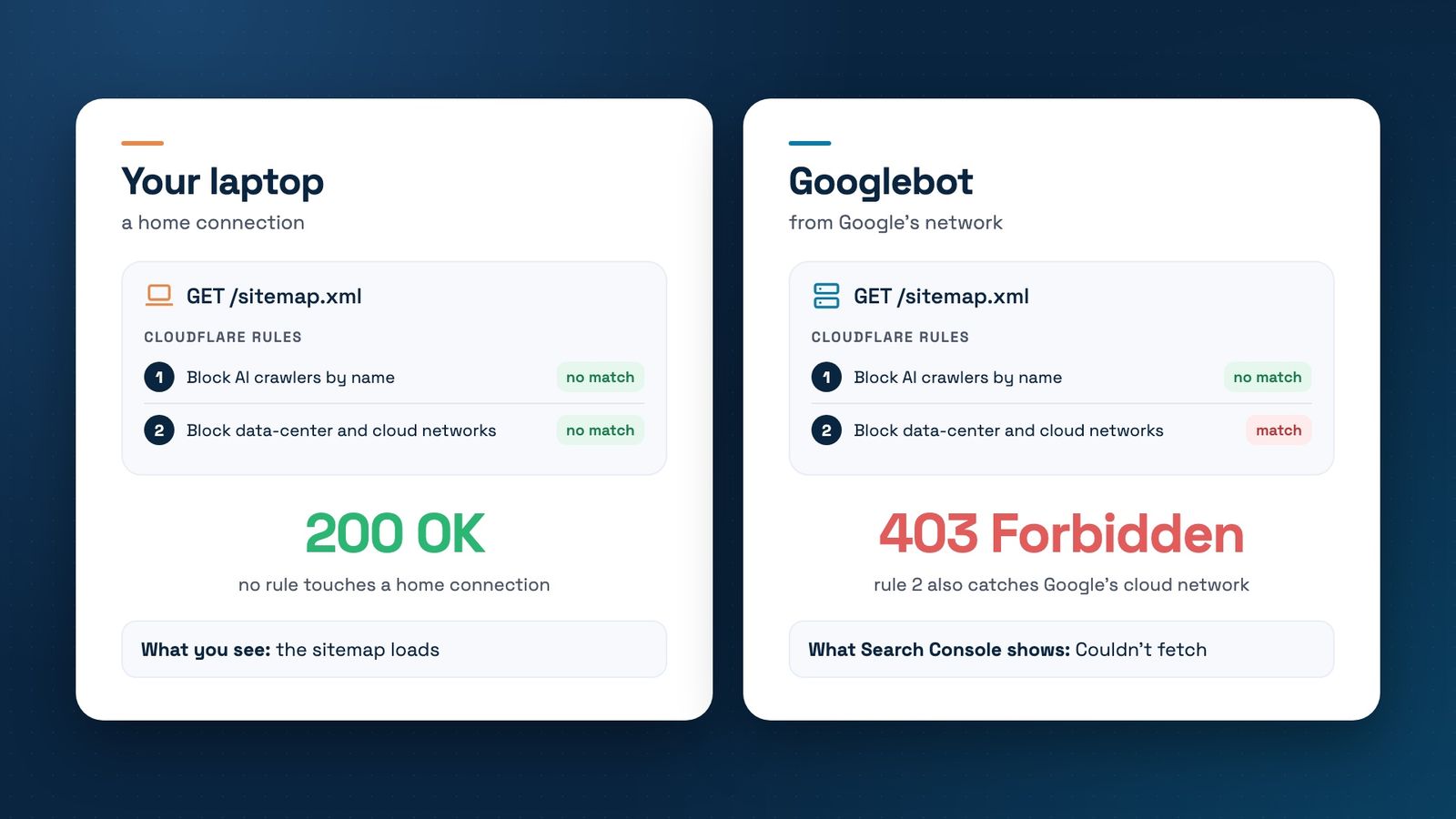
Search Console marks your sitemap as “Couldn't fetch”. You open it from your laptop and it loads: status 200. Both are true at the same time. In September 2026, on a store we look after, a Cloudflare rule built for scrapers was blocking Googlebot, and only Googlebot.
Google's help page for the Sitemaps report gives 5 causes for “Couldn't fetch”: robots.txt, a manual action, a wrong URL, a general server error and low crawl demand. A firewall isn't on the list, which is why this one takes long to find.
Why your laptop can't see the block
A Cloudflare rule can look at two things: the name the visitor gives, its user agent, and the network the request comes from. Your laptop comes from a home connection. Googlebot comes from Google's networks.
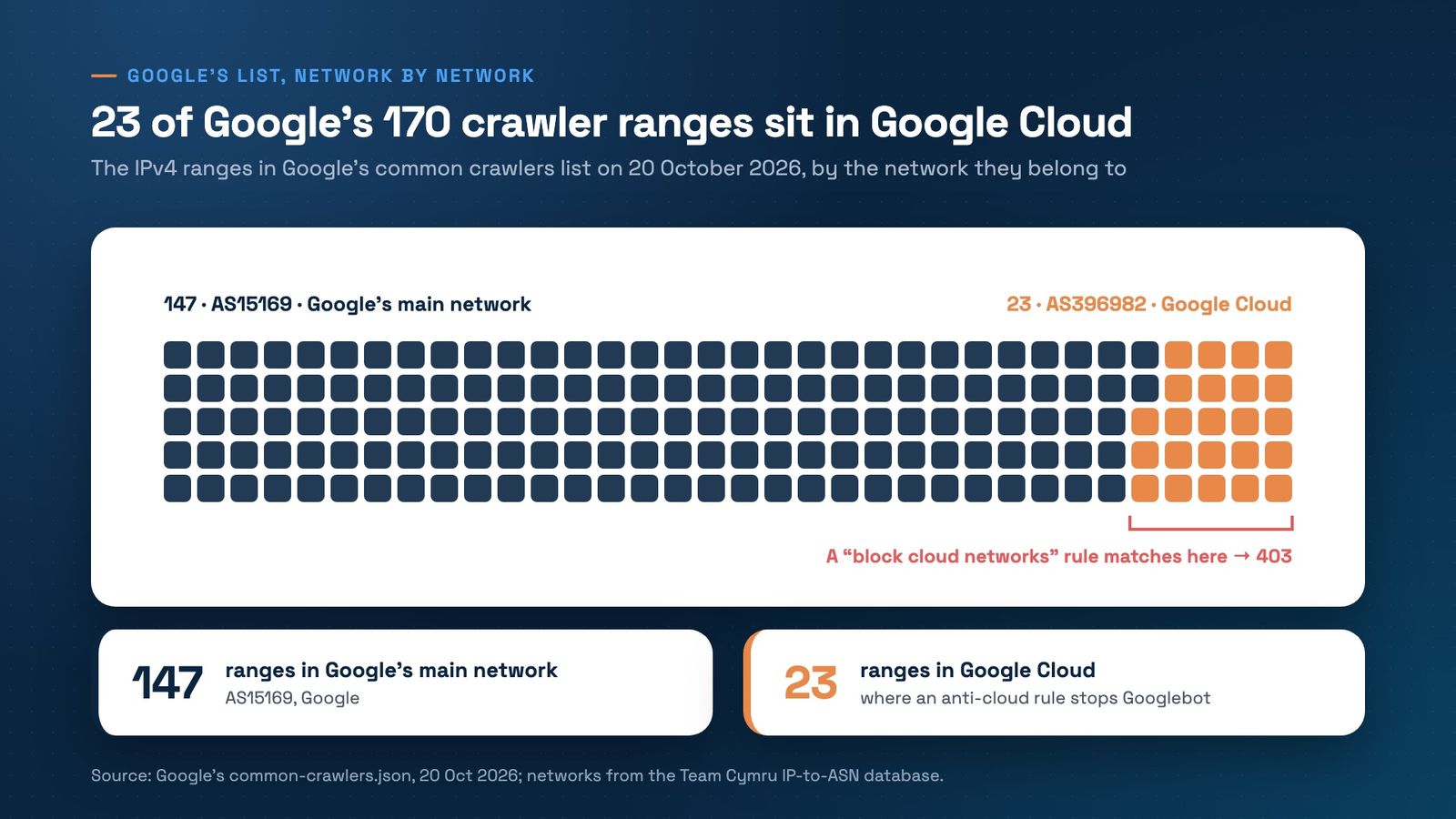
The store had two rules. The first blocked a few AI crawlers by name, on purpose. The second blocked data-center and cloud networks, to stop scrapers on rented servers. Google's crawlers partly live in such a network. We looked up the 170 IPv4 ranges in Google's published list on 20 October 2026: 147 belong to Google's main network, AS15169, and 23 to Google Cloud, AS396982. A rule against cloud networks catches Googlebot every time it crawls from those 23.
A test from your laptop with Googlebot's name only tests the first rule. The request still leaves from home, so the second rule never applies. That's how you get 200 and Google gets 403.
How to check in 3 steps
- In Search Console, open URL Inspection, paste your sitemap's address and click Test live URL. Google fetches it on the spot from the same crawler network as Googlebot, so you see whether your rules stop it.
- In Cloudflare, open Security, then Events, and filter on the /sitemap.xml path. Look for Google requests that were blocked or challenged, and the rule that did it.
- Check which sitemaps you submitted. After a migration, an old sitemap left in the list returns 404 and also shows as “Couldn't fetch”. Remove that one.
New since 15 September 2026: blocking AI training can block Google
Cloudflare changed its AI crawler settings on 15 September 2026. Setting Training to Block now stops Googlebot, Bingbot and Applebot too, search included. If someone changed that setting on your store after 15 September, it can be the same cause, with the same 403.
Why the fix depends on your rules
The fix is short, but it has to fit what you already have: the order of your rules, your Cloudflare plan and your AI crawler settings. Get it wrong and you either keep blocking Google or let the scrapers back in.
The obvious shortcut, letting through anything that calls itself Googlebot, is the one to avoid. Google itself says Googlebot's user agent is often spoofed by other crawlers. Scrapers would walk in under Google's name.
Bot Fight Mode, Cloudflare's free bot protection, adds one more catch: Cloudflare says it can't be bypassed or skipped with custom rules.
Why it can't wait
Google's documentation says Google doesn't index URLs that return a 4xx status code, and 403 is one of them. While Googlebot gets a 403, Google reads neither the sitemap nor the pages the same rule blocks: new products don't reach search, and a page that keeps answering 403 can drop out of the results. Search Console warns you about the sitemap, not about every page.
Seeing “Couldn't fetch” in Search Console? Write to us with your sitemap's address. We'll look at your Cloudflare rules and send you the fix that fits them, free.
Get the next article in your inbox
One email a month with new articles, speed fixes and the Magento security patches worth applying.