Guides
Delivery by Christmas: The Date Your Product Page Should Promise
October 21, 2026 - by Alexandru-Manuel Carabus
Ordered on 23 December at 13:00, the parcel arrives on the 24th. At 15:00, only on the 28th. The 2026 holiday calendar, the four rules behind the date on your product page, where it goes wrong and what to check before 1 December.
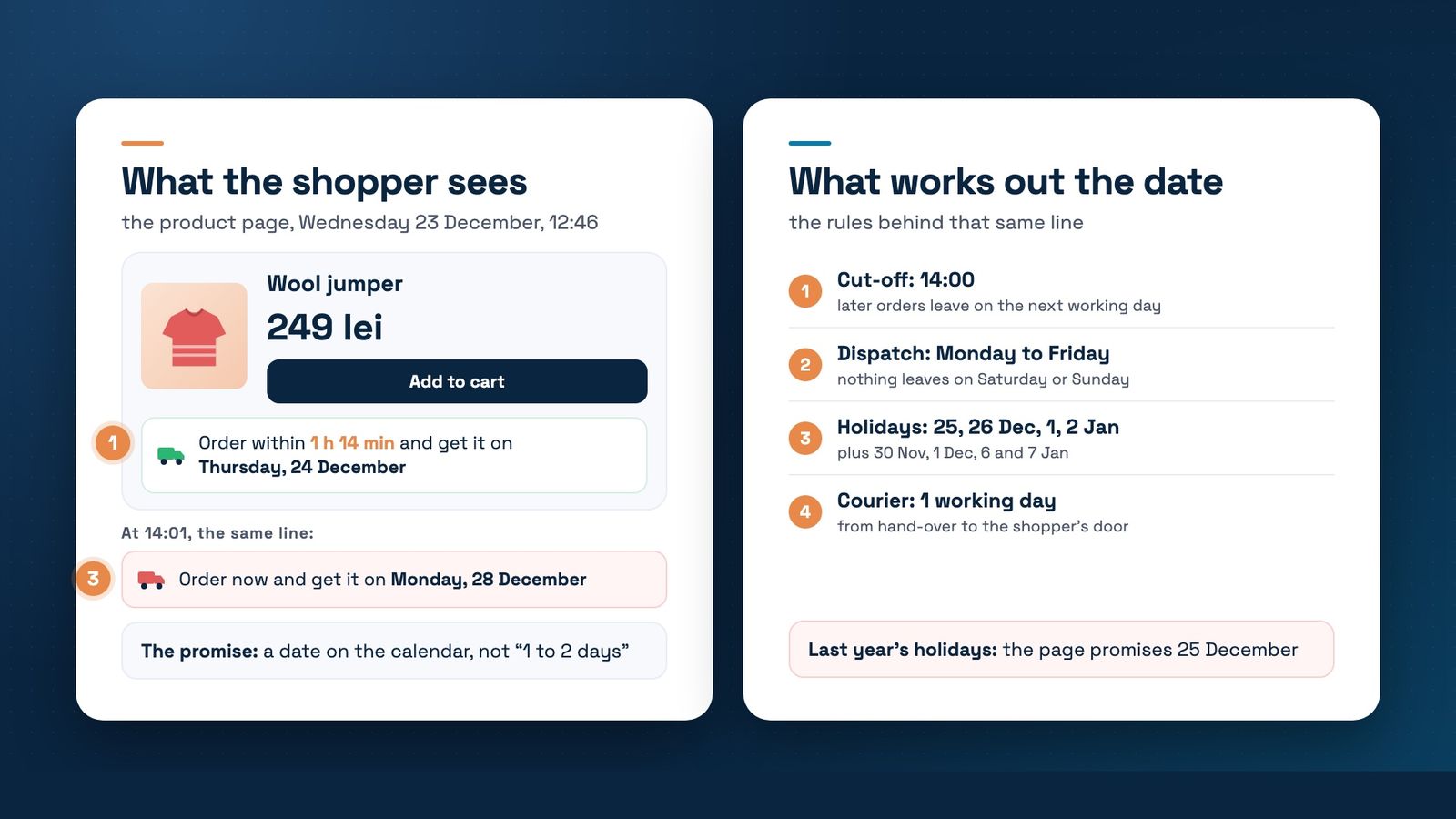
In December, shoppers don't ask “how fast is delivery?” but “will it arrive by Christmas?”. The product page has to answer with a date. In Baymard's 2025 benchmark, 48% of sites still showed delivery speed, like “1 to 2 days”, instead of the day the parcel arrives, and 83% didn't show the cut-off as a countdown.
Romanian law already asks for a date. OUG 34/2014, article 6(1)(g), requires you to tell shoppers the date by which you commit to deliver. And in a 2025 Cargus survey, 11% of shoppers said the worst case is a parcel that arrives after Christmas.
The 2026 calendar, day by day
- Monday 30 November and Tuesday 1 December: St Andrew's Day and National Day. With the weekend, that's a 4-day break. Cargus delivers parcels collected on 28 and 29 November from 2 December.
- Thursday 24 December: a working day, but a short one. For 2026, Cargus has announced reduced hours, until 16:00.
- Friday 25 and Saturday 26 December: Christmas. Nothing is delivered on Sunday the 27th, so deliveries start again on Monday the 28th.
- Thursday 31 December: a working day, usually with reduced hours too. Last year Cargus worked until 13:00, and that day's parcels arrived from 5 January.
- Friday 1 and Saturday 2 January: New Year. Work starts again on Monday 4 January.
- Wednesday 6 and Thursday 7 January: Epiphany and St John's Day, public holidays added by Law 52/2023. Old lists miss these easily.
The days come from the Romanian Labour Code, article 139. For Christmas 2026, only Cargus has published its schedule so far, on its holiday page. The others usually announce theirs in December: FAN Courier published its 2025 schedule on 9 December.
How the date on the page is worked out
The date the shopper sees comes from four rules, applied in order:
- The cut-off. An order placed after it leaves on the next working day.
- Dispatch days. If the warehouse works Monday to Friday, a Friday evening order leaves on Monday.
- Holidays. Neither the warehouse nor the courier works on public holidays, or on the days you close.
- Courier time. Usually one working day from hand-over to the shopper.
For an in-stock product with a 14:00 cut-off and a courier that takes one working day, the calendar looks like this:
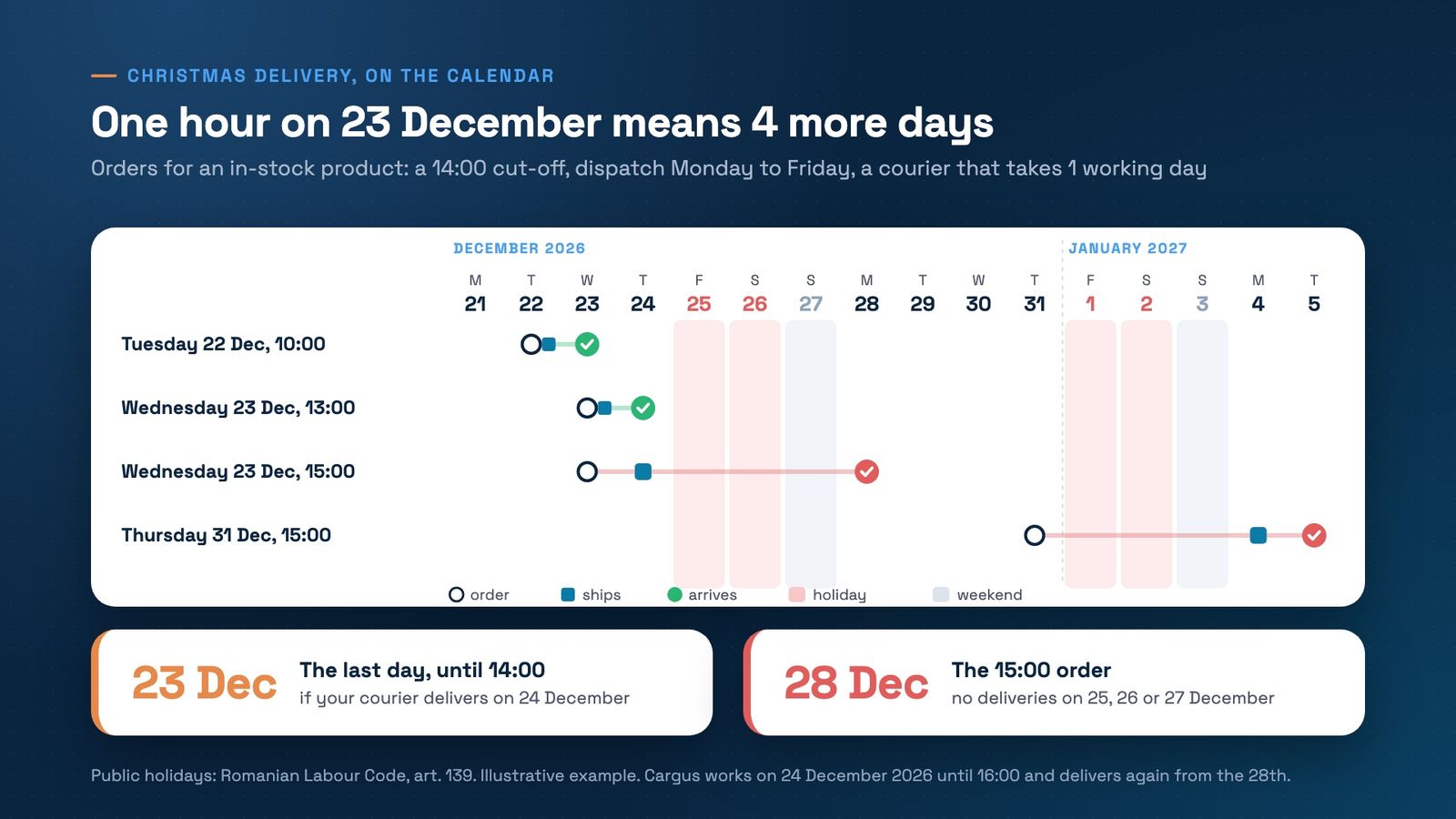
An order on Wednesday 23 December at 13:00 leaves the same day and arrives on Thursday the 24th. The same order at 15:00 leaves on Thursday and only arrives on Monday 28 December: the 25th and 26th are public holidays and the 27th is a Sunday. One hour, four days.
The example assumes your courier delivers on 24 December. For 2026, Cargus works that day until 16:00, and parcels collected on the 24th arrive from 28 December. Other couriers ask for hand-over much earlier: in 2025, Packeta set the last hand-over on 18 December and guaranteed nothing after the 23rd. Build in your own courier's schedule, not an average.
Where the date goes wrong
We find these often when we check stores before the holidays:
- The holiday list is last year's. If the module still only has 1 January 2025, the page promises delivery on 25 December.
- The text doesn't change after the cut-off. At 16:00 the page still says “order by 14:00”, so it promises a day that's gone.
- Different promises in different places. The product page says one day, the terms say two, the confirmation email says “24 hours”. The shopper remembers the shortest.
- The days you close are missing. If the warehouse is shut from 24 December to 4 January, no legal holiday rule knows that.
- Out-of-stock products get the in-stock date. A product that comes from the supplier in 5 days can't promise 24 December.
It matters legally too. If a shopper tells you before ordering that delivery by a certain date is essential and you miss it, OUG 34/2014, article 18, which transposes article 18 of the Consumer Rights Directive, lets them cancel the contract without giving you extra time. You refund them within 7 days.
What the page should say
A date on the calendar, not a range. A few examples for the same day:
- Before the cut-off: “Order within 1 h 14 min and get it on Thursday, 24 December.”
- After the cut-off: “Order now and get it on Monday, 28 December.”
- In the site banner, from 21 December: “Last orders delivered before Christmas: Wednesday 23 December, by 14:00.”
The honest promise loses a few orders on the evening of 23 December. The wrong one loses the customer and brings a return.
What to do before 1 December
- Add every public holiday from 30 November 2026 to 7 January 2027 to the module, plus the days you close.
- Check the cut-off for each courier and ask for their holiday schedule. If you change the cut-off, do it after Black Friday, not in campaign week.
- Put the same promise on the product page, cart, checkout, terms, FAQ and confirmation email.
- Open a product page after the cut-off and one before a holiday. Read the date exactly as a shopper reads it.
- Prepare the last-order-day banner and schedule it for 21 December.
On Magento and Hyvä
In Liquid Framework, our delivery-date module works out the day from the cut-off, dispatch days and public holidays, and shows it on the product page, in listings and in the cart. After the cut-off it can change the text by itself. The date stays an estimate: after dispatch, the courier's tracking takes over.
Want to know what date your store promises on 23 December at 15:00? Book a free strategy call. We'll go through your rules and calendar together and tell you what to change before 1 December.
Get the next article in your inbox
One email a month with new articles, speed fixes and the Magento security patches worth applying.