Guides
Black Friday on Magento: 9 Checks Before 6 November
October 21, 2026 - by Alexandru-Manuel Carabus
eMAG's Black Friday 2026 is on 6 November, and the struck-through price is set from 7 October. 9 checks for a Magento store: prices, price rules, cron, cache, checkout and the day itself.
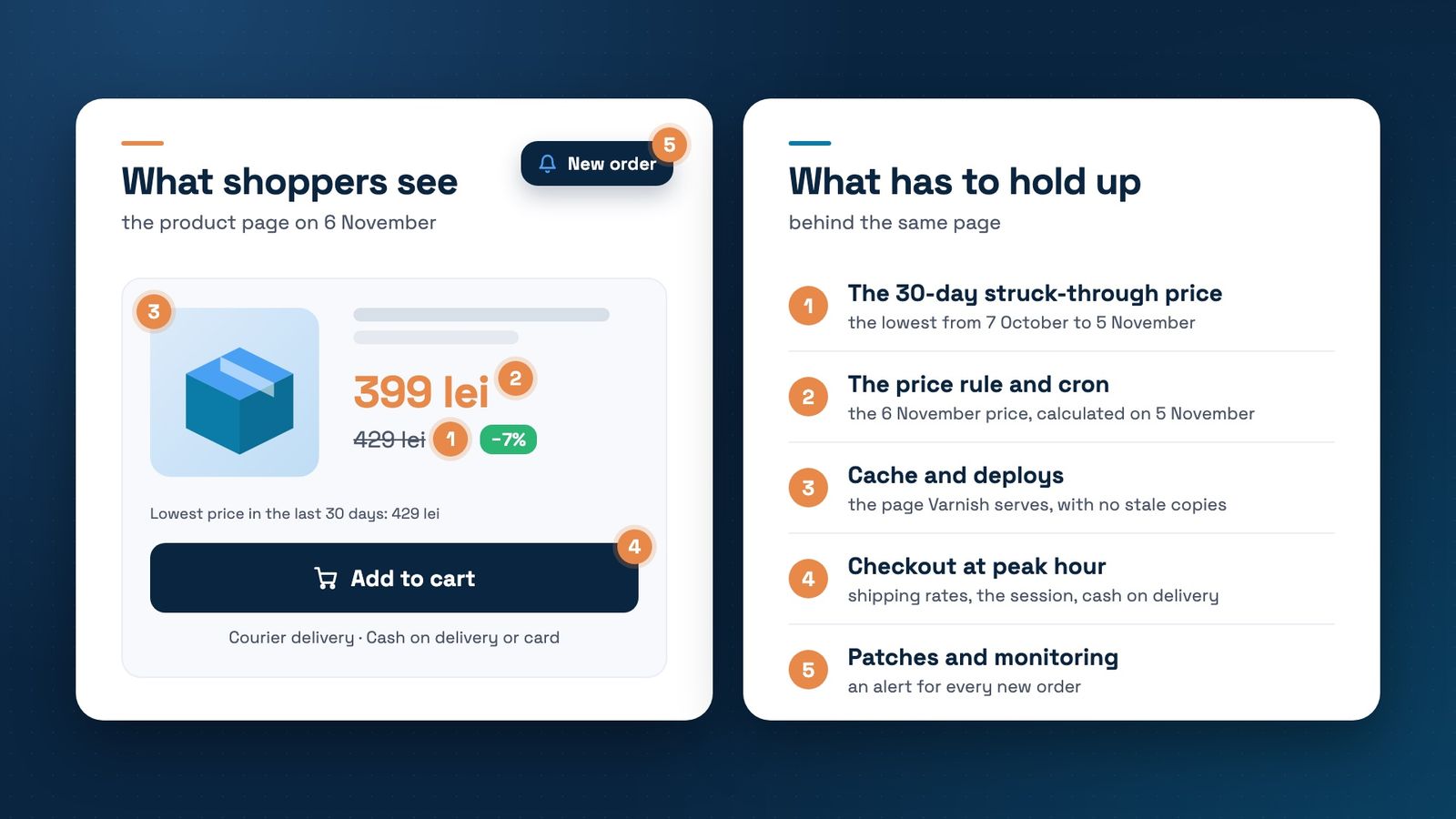
eMAG has announced Black Friday 2026 for Friday, 6 November. Last year, on 7 November 2025, the same day brought it orders worth more than 986 million lei from more than 702,000 customers, according to StartupCafe. If your campaign starts on 6 November too, the preparation has already begun, even if you haven't touched anything yet: the 30-day window that sets the struck-through price opened on 7 October.
Below are 9 checks for a Magento store, in the order we would run them: prices, the engine that calculates them, the checkout and the day itself. All examples assume a campaign that starts on 6 November. If yours starts on another day, shift the dates by the same number of days.
1. The struck-through price: the lowest of the last 30 days
In Romania the rule comes from HG 947/2000, article 4¹, added by HG 686/2022: every price reduction announcement shows the prior price, and the prior price is the lowest price charged in the 30 days before the reduction. For a reduction that starts on 6 November, the window runs from 7 October to 5 November.
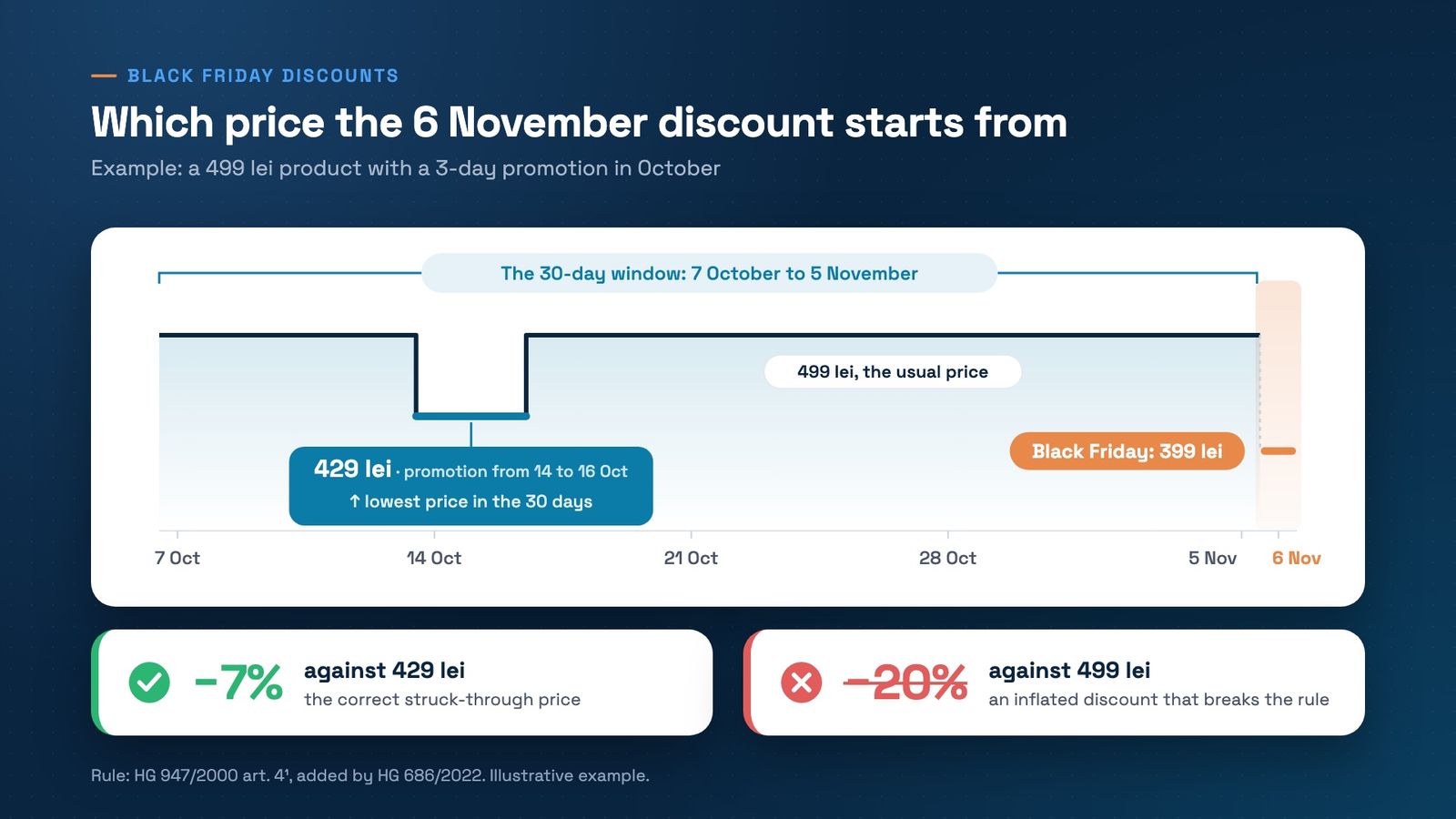
In the chart's example, a 499 lei product had a promotion at 429 lei from 14 to 16 October. On 6 November you sell it for 399 lei. The correct struck-through price is 429 lei, and the discount shown is 7%, not 20%. Four cases are worth checking product by product:
- Price rises in October don't help. The reference is the lowest price in the window, not the latest, so a higher price before the campaign doesn't increase the discount you can show.
- Discounts that grow within one campaign keep the price before the first reduction. If you start on 2 November at 10% and reach 20% on 6 November, the reference stays the price before 2 November.
- A second campaign has its own window. If you discount again on 27 November, Black Friday in the US, the window runs from 28 October to 26 November. It includes the 399 lei of 6 November, which becomes the new struck-through price.
- New products, on sale for less than 30 days, use the lowest price since launch as the reference, and that period must be shown.
A missing prior price carries a fine of 5,000 to 30,000 lei, and in an ANPC inspection the store proves its prices with its own records. Magento Open Source doesn't keep a price history. If you don't have a module that keeps one, export the campaign products every day from now on, from System > Data Transfer > Export, and keep the dated files. The rule in full, plus the Omnibus module we use, is in our post on GPSR and Omnibus. This post is not legal advice.
2. Price rules: calculated only for yesterday, today and tomorrow
If the discount comes from a catalog price rule (Marketing > Catalog Price Rule), Magento doesn't calculate its price for the whole campaign. In the code of the Magento_CatalogRule module, every reindex writes prices for 3 days: yesterday, today and tomorrow. A rule that starts on 6 November only gets prices when the index runs on 5 November or later.
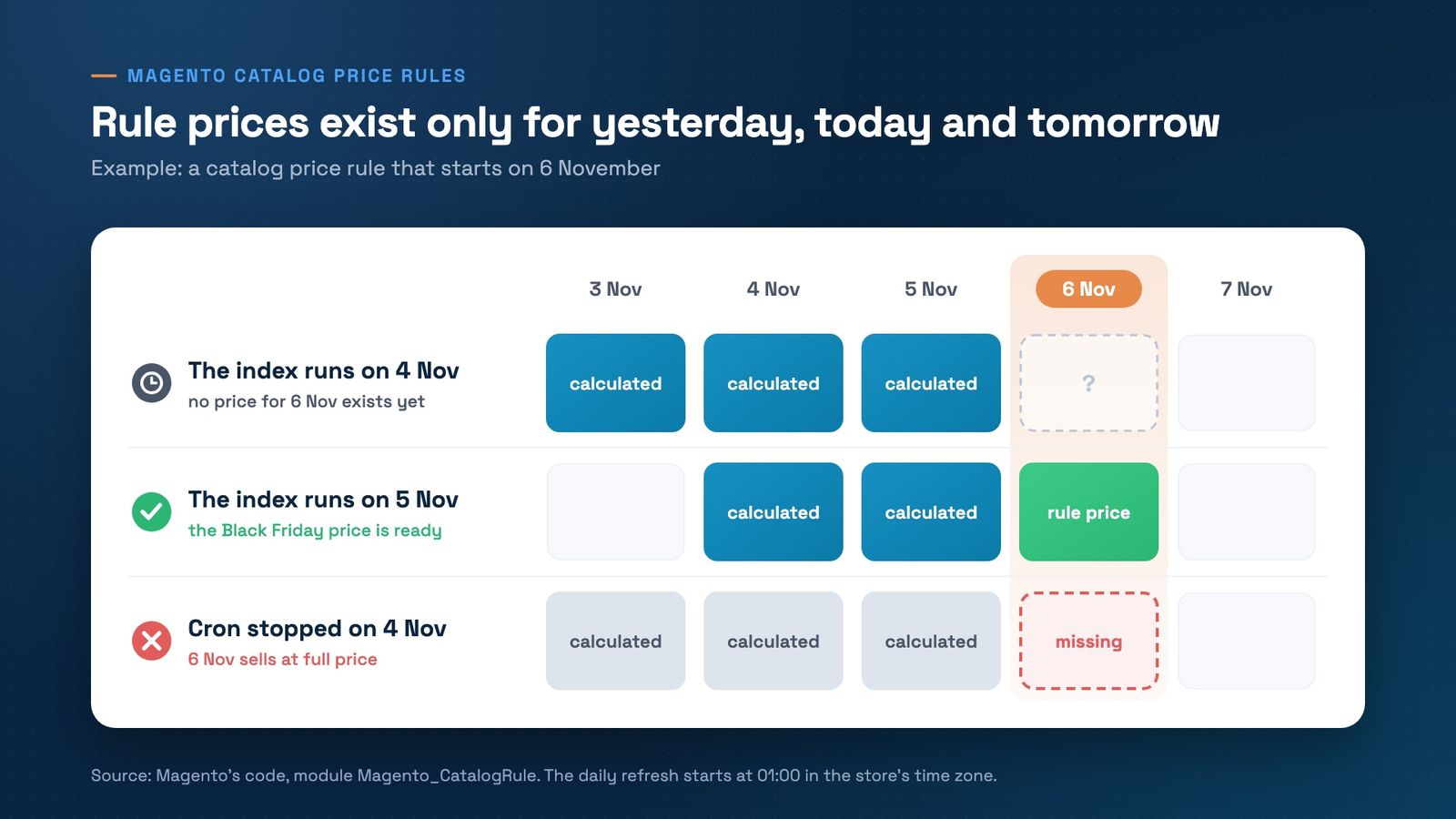
The daily refresh is the cron job catalogrule_apply_all, scheduled at 01:00 in the store's time zone. It only marks the index as invalid, and another job, which runs every minute, rebuilds it. If cron is stuck on the night of 5 November, Black Friday starts at full price, even though the rule looks right in the admin.
The second trap: if you change a product's base price, the rule price isn't recalculated on its own, and the percentage keeps applying to the old price. After every price import, run bin/magento indexer:reindex catalogrule_rule catalog_product_price.
On 5 November, after 01:00, count the rows for the campaign day: SELECT COUNT(*) FROM catalogrule_product_price WHERE rule_date = '2026-11-06'; Zero rows means Black Friday has no prices yet.
3. Cron: read the database, not the log
The check above depends on cron, like scheduled indexers, message queues and many integrations. An empty log file tells you nothing, because the source of truth is the cron_schedule table: SELECT status, COUNT(*), MAX(finished_at) FROM cron_schedule GROUP BY status;
- Healthy: success rows with a finished_at in the last 5 minutes.
- Stuck: a job in running for hours, with an empty finished_at. It is a dead process holding a place other jobs need.
- Stopped: many pending rows and no new success. Cron isn't starting at all.
4. Sorting by price in the big categories
Open 3 big categories and sort by price, high to low. If one comes back empty or with fewer products than it has, the price index is missing rows. It happens, for example, on stores that removed MSI, hide out-of-stock products and run the price index on Update by Schedule: a product that comes back in stock doesn't get its index row back. Before a campaign with many restocks, a full reindex of catalog_product_price overnight fills the gaps.
5. The deploy freeze and the cache
Pick a day after which you ship nothing new, 3 November for example, and from then on fix only what is broken. The reason is the cache. Magento purges Varnish by tags: when you save a product, a category or a CMS block, it asks to purge only the pages that contain it. A theme, CSS or layout change touches no tag, so it purges nothing.
On our own demo store, after a successful deploy, Varnish was still serving a page rendered 8 days earlier, even though bin/magento cache:flush had run. The flush never reached Varnish, and only restarting it removed the old page. After the last deploy before the freeze, look for the change you just shipped in the public page's source, and check in app/etc/env.php that http_cache_hosts points at the Varnish server.
Cache warming belongs here too. After a full flush, every page renders from scratch, and a cache warmer crawling the whole store in parallel competes with shoppers for the same server. Schedule the full crawl at night, with few requests at a time, and don't flush the whole cache on campaign day.
6. The checkout, tested at peak hour
Test the checkout at the hour with the most orders last month, which you can see in Analytics, not in the morning when the server is idle. At peak hour the same server handles shoppers, crawlers and cache warming. What to watch:
- Shipping rates. Every change in the checkout recalculates them. In our profiling of Hyvä Checkout, a single shipping method change requested rates 3 times, across the save and the requests that follow it. If your courier module asks the courier's API for the price on every calculation, a slow API at peak adds up 3 times, so that call needs a timeout and a short cache. We wrote about couriers in the checkout in our post on Hyvä Checkout.
- The session lock. With sessions in Redis and locking on, which is the default, two requests from the same shopper don't run in parallel: the second waits in steps of 0.5 seconds, and on a loaded server those steps add up.
- Cash on delivery. On Heureka Group's slide at The Base Event, 51% of orders in Romania were paid in cash. Check that cash on delivery shows for every shipping method and that its Maximum Order Total setting allows big Black Friday baskets.
7. Security patches, before the freeze
A patch applied after 3 November is a deploy in the days when you don't want deploys. Check your version with bin/magento --version, compare it with Adobe's security bulletins and apply what's missing before the freeze, tested on staging first. The exception is an emergency patch for a vulnerability that is already being exploited: that one goes in at once, even on campaign day. The full list is in our Magento security checklist.
8. Speed tests you can rely on in November
PageSpeed Insights' real-user data covers 28 days. A fix made on 1 November has at most 5 days in the window on 6 November, so you won't see it there before the campaign. In the last weeks, rely on two tests repeated on the same day: the PageSpeed score run 5 times, keeping the median, and the six-step shopping trip test. Why the score and the real-user data say different things is in our post on the PageSpeed score.
9. Campaign day: who watches what
On 6 November it isn't enough to find out that something broke, you need to find out first. Hyvä Pocket, Hyvä's free app for iPhone, iPad, Mac and Apple Watch, sends a notification for every new order, so you notice at once when orders stop. Decide in advance who is on call, who can roll back and what you do if card payments fail: cash on delivery stays on.
The calendar, in short
- From today: a daily export of campaign prices, the cron_schedule check and the checkout test at peak hour.
- By 3 November, for example: security patches and the last deploy, then the freeze.
- 5 November, after 01:00: the rows for 6 November in catalogrule_product_price and the price sort in 3 big categories.
- 6 November: order notifications on, no full cache flush and no deploys.
- 27 November, if you run another campaign: the struck-through price starts from the lowest price between 28 October and 26 November.
Want to run the 9 checks on your store before 6 November? Book a free strategy call. We'll look at prices, cron and checkout together and tell you what is worth fixing first.
Get the next article in your inbox
One email a month with new articles, speed fixes and the Magento security patches worth applying.