Guides
PageSpeed Score or Real Users: Which Number to Trust
October 20, 2026 - by Alexandru-Manuel Carabus
The score comes from one test, real-user data from 28 days of visits. At Equitana, real-user data needed 4 weeks to show the move. When to trust each one.
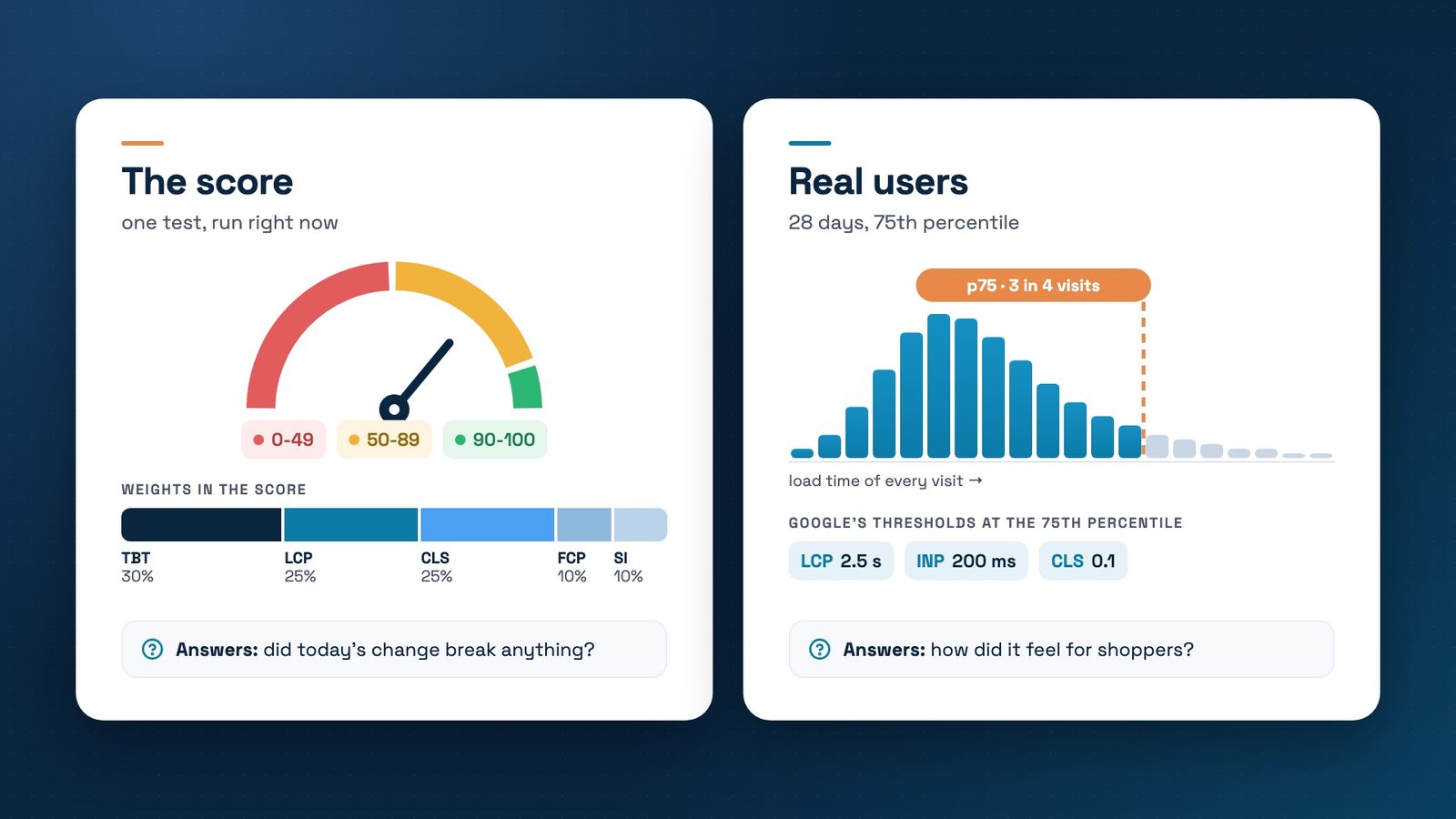
You open PageSpeed Insights, type in your store's address and get two things: real-user data at the top, and a score from 0 to 100 below it. They look like one measurement, but they are two, and they answer different questions.
We use both in our case studies. At Vitacom, the score went from 12 to 100, measured with Google PageSpeed Insights on the live store. At Equitana, the main content on phones went from 4.2 to 1.1 seconds, measured on real users. Below is what each number measures and when to rely on it.
The score: one test, run right now
When you start the analysis, Google loads the page once, on a mid-range phone and a slowed mobile connection that it simulates on its own servers. For desktop it uses a wired connection. The score combines 5 measurements, with fixed weights:
- Total Blocking Time, 30%: how long scripts block the page;
- Largest Contentful Paint, 25%: when the main content appears;
- Cumulative Layout Shift, 25%: how much the page moves while it loads;
- First Contentful Paint and Speed Index, 10% each: how quickly the page starts to appear.
From 90 to 100 the score is green, from 50 to 89 orange, below 50 red. It is good for two things: seeing the effect of a change on the same day, and finding out, from the list below it, what is holding the page back.
But it isn't a fixed number. On 25 August 2026 we ran Lighthouse 7 times on the Equitana store, still on Magento 1: it scored 36 and 37 on mobile, and between 50 and 63 on desktop. The Lighthouse documentation says the median of 5 runs is twice as stable as a single run.
Real users: 28 days, 75th percentile
The top of the report comes from the Chrome UX Report: real visits in Chrome over the last 28 days. Each value is the 75th percentile, the time that 3 out of 4 visits stay within. A store passes Core Web Vitals only if all three values are good at the 75th percentile, according to Google's documentation:
- Largest Contentful Paint: 2.5 seconds or less;
- Interaction to Next Paint: 200 milliseconds or less;
- Cumulative Layout Shift: 0.1 or less.
If the page doesn't have enough visits, PageSpeed Insights shows the data for the whole site. If the site doesn't either, the section stays empty. The same data feeds the Core Web Vitals report in Search Console.
Why the two numbers don't match
1. The score changes the same day, real-user data takes 28 days
Equitana's new store went live at the end of August. The real-user data didn't jump at once, because each 28-day window dropped one week of the old store at a time. On phones, the main content went from 4.17 seconds in the window ending 22 August to 3.37, then 2.35, 1.70 and 1.30 seconds. On 26 September it reached 1.11 seconds, the first window entirely on the new store.
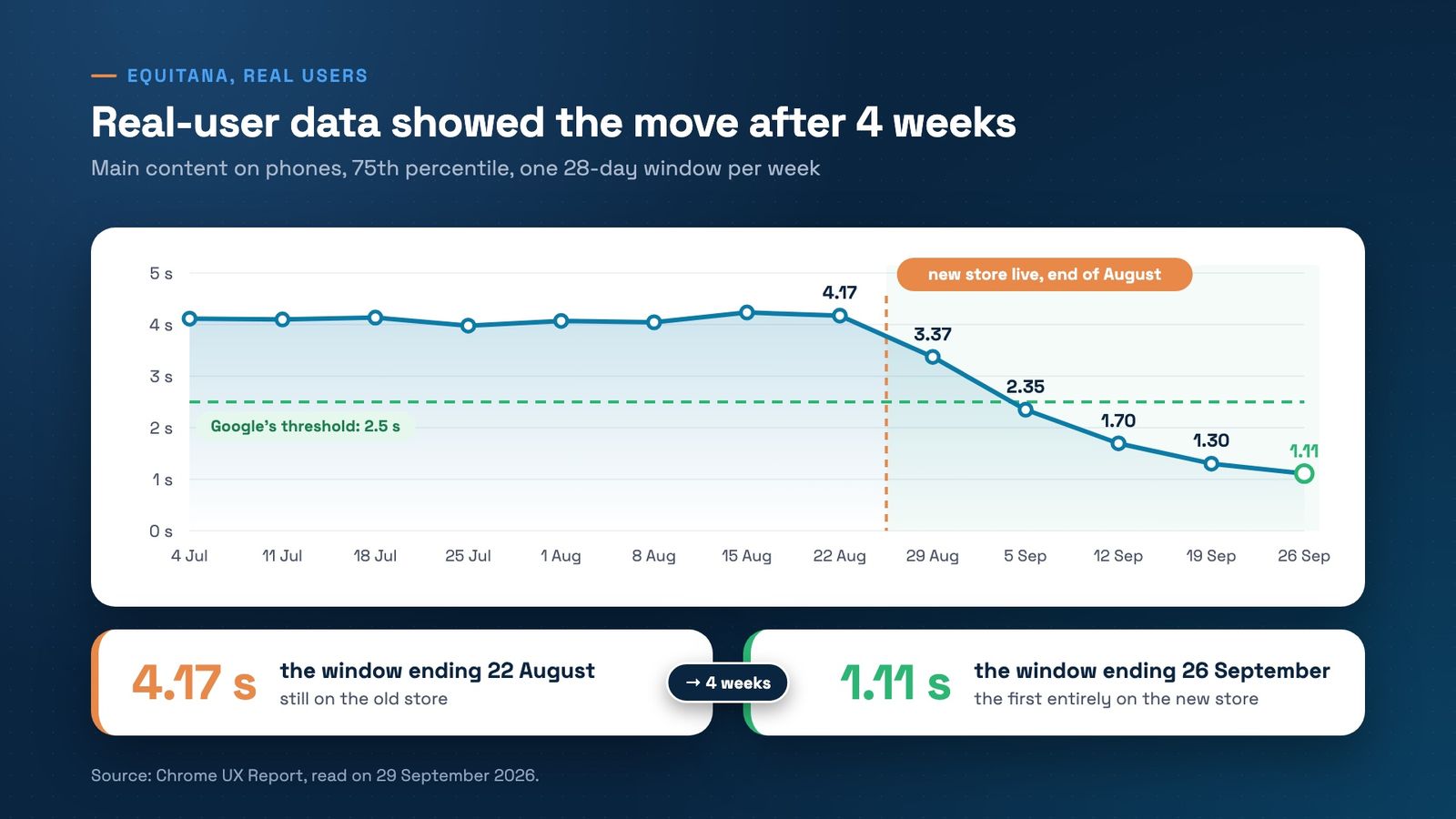
After a launch, the score tells you that same day whether you broke something. Real-user data gives you the verdict after 4 weeks.
2. Server response: 12 ms in the test, hundreds of milliseconds for shoppers
At Vitacom, PageSpeed Insights measured a server response of 12 ms on the live store, down from 15,814 ms. That is the time the server takes to answer. Real-user data also adds the trip to each shopper: the DNS lookup, setting up the connection, the mobile network. That is why real-user response time is higher even on a fast store: at Equitana it is 0.34 seconds on phones, against Google's threshold of 0.8 seconds. Both numbers are right; they measure different things.
3. The test doesn't click
Interaction to Next Paint, how quickly the page reacts to a tap, isn't part of the score at all, because the test doesn't tap anything. Total Blocking Time stands in for it, at 30% of the score. And real shoppers arrive on phones newer or older than the simulated one, on better or worse networks.
Which number to trust, and for what
- For Google and for your shoppers: real-user data. What counts is whether the 3 values pass at the 75th percentile, not the score.
- For a change you made today: the score, run 5 times on the same page, before and after. Compare the medians.
- For what to fix: the diagnostics list below the score. What we usually fix on Magento is in the post on Core Web Vitals.
- For history: CrUX Vis, which shows 40 weekly windows, about 9 months, for phones and desktops.
- For how long a shopper waits between clicks: the six-step test, timed on a screen recording.
What to check this week
- Read the top first: open PageSpeed Insights for your home page, one category and one product.
- See which data you get: data for the page, or for the whole site.
- Run the score 5 times: on the same page, and write down the lowest and highest result.
- Open Search Console: the Core Web Vitals report shows how many phone pages are rated good. At Equitana, on Magento 1, it was 3 of 1,395.
- After a launch: wait 28 days before you draw conclusions from real-user data.
Have your store's PageSpeed report and not sure which number to believe? Book a free strategy call. We'll read it together and tell you what is worth fixing first.
Get the next article in your inbox
One email a month with new articles, speed fixes and the Magento security patches worth applying.