Guides
September Had Two Magento Patches. Did You Apply Only One?
October 21, 2026 - by Alexandru-Manuel Carabus
On 7 September, the StyleSmuggler hotfix. On 8 September, the regular monthly patch. Adobe requires the monthly patches in order, and October's closes BlockStrap, which gets around the hotfix. How to check what your store has in 10 minutes.
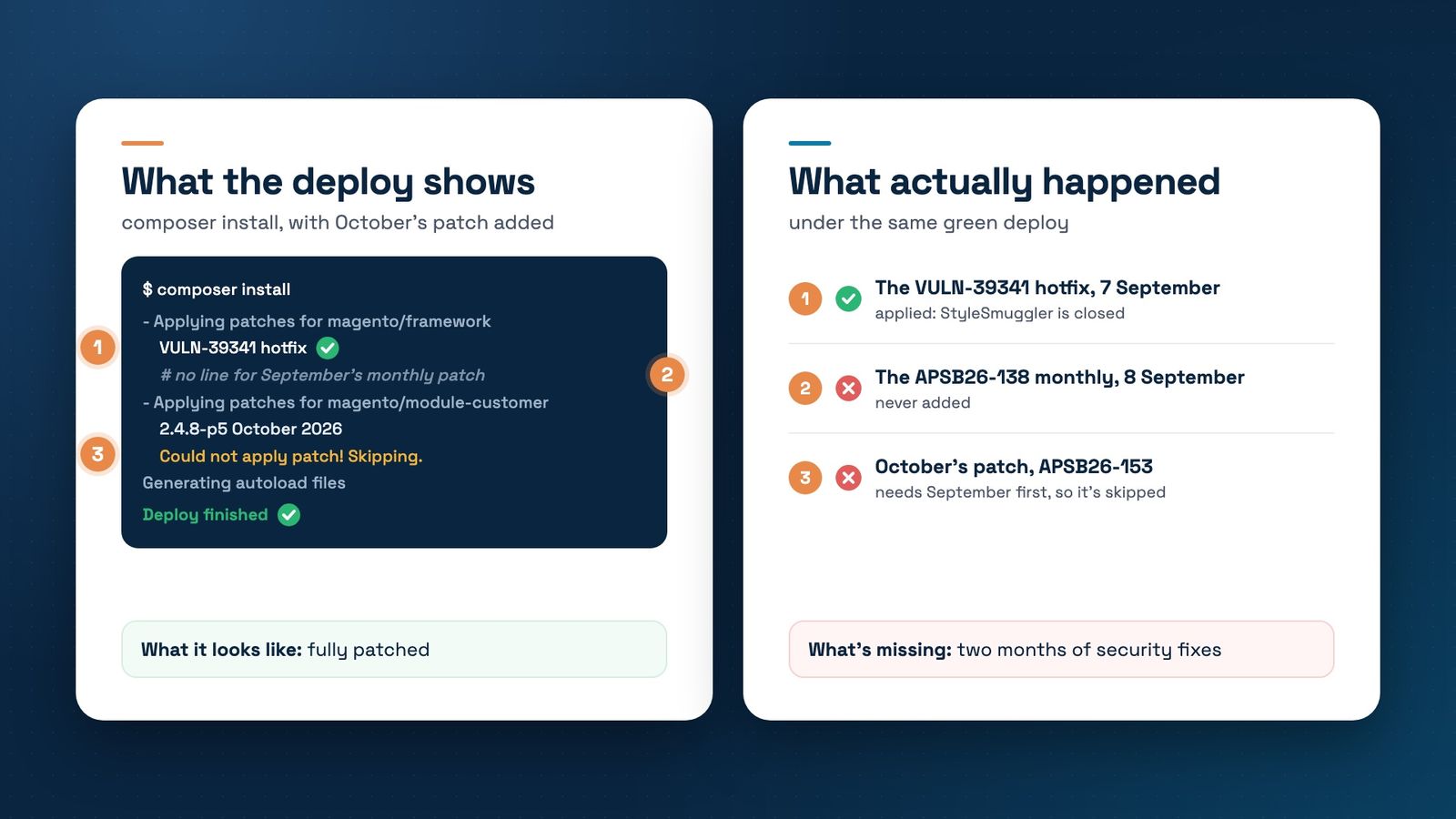
On 7 September 2026, Adobe published bulletin APSB26-146 out of band, the hotfix for StyleSmuggler, a flaw already under attack, with a CVSS score of 10.0. The next day, 8 September, brought the regular monthly patch, APSB26-138, with 8 vulnerabilities. Two bulletins in two days, for two different patches.
It's easy to miss: the hotfix was urgent, it went on that night, and September looked done. The trouble shows up a month later. October's patch, APSB26-153, published on 13 October, closes 11 vulnerabilities, including BlockStrap, which gets around the September hotfix itself. And Adobe requires the monthly patches in order: October assumes September is already there.
Two bulletins in September, a third in October
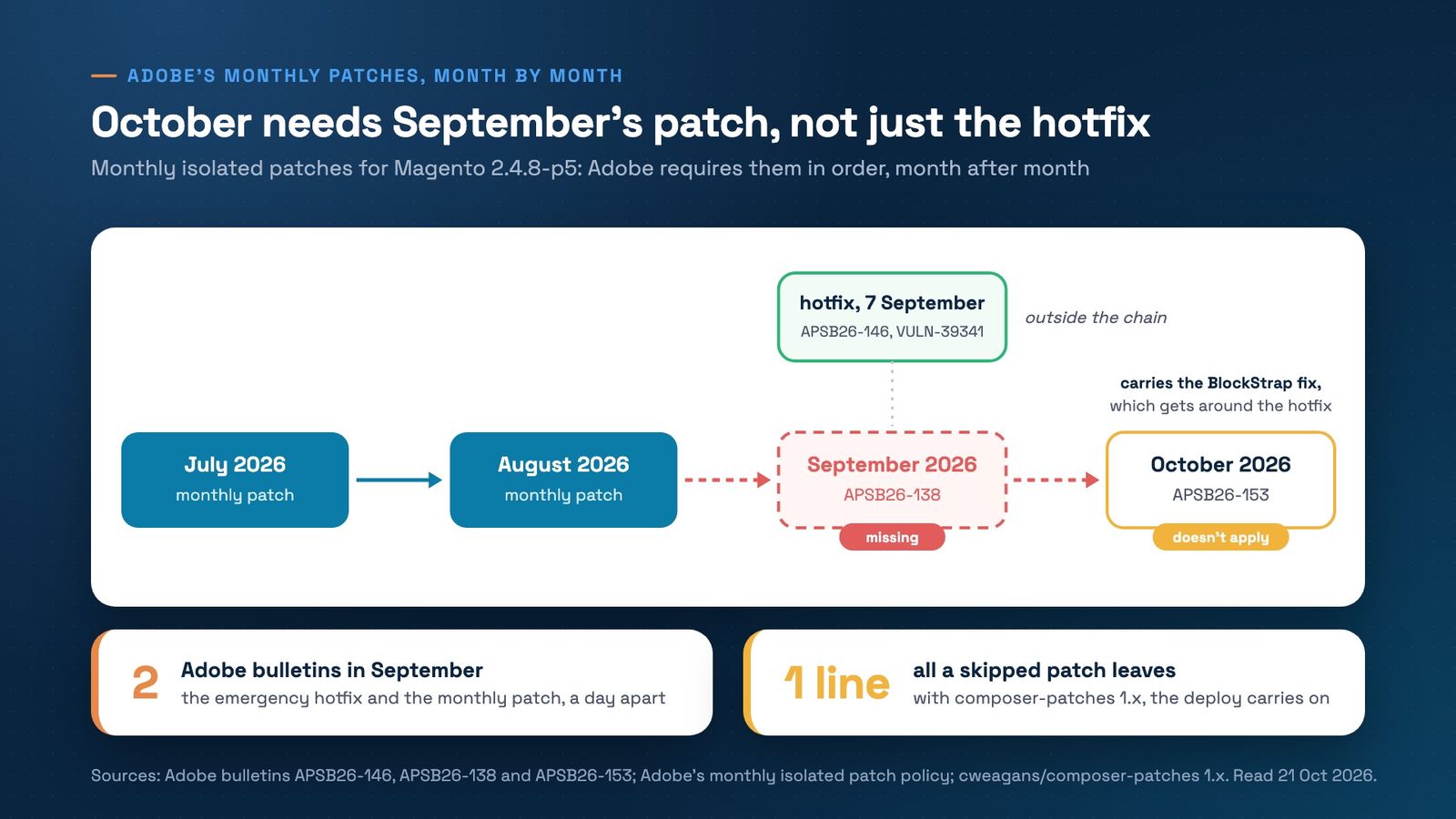
- APSB26-146, 7 September. The VULN-39341 hotfix for StyleSmuggler, CVE-2026-75650. Priority 1, already exploited. It ships as a separate file, not inside the monthly patch.
- APSB26-138, 8 September. The monthly isolated patch, with 8 vulnerabilities, two of them B2B only. Priority 2. For 2.4.8-p5 the file is 2-4-8-p5-sep-2026.zip.
- APSB26-153, 13 October. October's monthly patch, with 11 vulnerabilities, three of them B2B only. Among them is CVE-2026-103849, with a CVSS score of 10.0, which Sansec named BlockStrap and describes as a bypass of the September hotfix.
Why October needs September
Since July 2026, Adobe no longer waits for a full -pN release to ship security fixes. It publishes them monthly, on the second Tuesday, as isolated patches. Adobe describes them as non-cumulative: each month carries only its own fixes and goes on in order, on top of the months before. October's file starts from the code as it looks after September.
If you have the hotfix but not September's monthly patch, you've skipped a link. When we prepared October for the stores we look after, the 2.4.8-p5 file didn't apply on top of August without September. And without October, BlockStrap stays open, even with the hotfix in place.
On Magento Open Source the version matters too. Since September, Adobe offers the monthly files for free only for 2.4.7 and later, according to note KA-44020. For 2.4.6, 2.4.5 and 2.4.4 you need Adobe Commerce access.
Why the deploy doesn't tell you
Adobe tells you to apply the files with the patch command and to check the result with the Commerce Version Tool. Many Magento projects apply them through composer instead, with the cweagans/composer-patches plugin. In version 1.x, a patch that doesn't apply prints “Could not apply patch! Skipping.” and is skipped, and the install carries on. Only the composer-exit-on-patch-failure setting stops the deploy.
The result is one line among dozens, in a deploy that finished successfully. Sansec warns about the same thing: composer patch plugins can skip part of a patch without failing the build, and scripts that add “|| true” hide the failure.
Check it in 10 minutes
- Look in composer.json, or your patches file, for September's entries, not just VULN-39341. For 2.4.8-p5 the monthly file is 2-4-8-p5-sep-2026.zip.
- Run composer install on staging and search the output for “Could not apply patch”.
- Check whether composer.json has “composer-exit-on-patch-failure”: true under extra. Without it, a failed patch doesn't stop the deploy.
- Run php vendor/bin/patch-status, Adobe's Commerce Version Tool, and see which months show as applied.
The right order
The months go on in sequence: July, August, September, October, each on top of the one before. The VULN-39341 hotfix is separate and can go on at any point. Test on staging, then production.
The next dates on Adobe's calendar are 10 November and 8 December, marked optional because of the holiday code freeze. Decide now which day each one goes in, so it doesn't land on top of your campaigns.
The rest of the StyleSmuggler response still applies: on top of the hotfix, Adobe requires rotating the encryption key and every credential, as we described in our StyleSmuggler post. The monthly patch routine is in the maintenance guide.
Not sure which patches your store actually has? Book a free strategy call. We'll read your composer.json and the deploy output together and tell you what's missing.
Get the next article in your inbox
One email a month with new articles, speed fixes and the Magento security patches worth applying.