Guides
24 Versions of Every Product: How a B2B Magento Store Can Still Be Cached
November 7, 2026 - by Alexandru-Manuel Carabus
Been told a B2B store with customer-group pricing can't be cached? At Vitacom every product has 24 cached versions, and logged-in business clients get cached pages too, with their own group's price. How it works, what is never cached, and the five-minute check you can run yourself.
If you sell B2B on Magento, you have probably heard the line: "We have customer-group pricing, so we can't cache the pages." It sounds logical. Every company sees a different price, so keeping one copy of a page for everyone seems impossible.
You don't need one copy. At Vitacom, every product has 24 versions in the cache, and a logged-in B2B client gets a cached page too, with their own group's price. Below we explain how that works, what is never cached, and how to check for yourself, in five minutes, whether your store uses its cache or skips it.
Why B2B looks impossible to cache
The page cache (on Magento, usually Varnish) keeps a finished copy of each page. The next visitor gets it in milliseconds, without Magento running its code and database queries again.
On a B2C store everyone sees the same price, so one copy is enough. On a B2B store a natural fear appears: what if company A sees the price company B negotiated? To avoid the risk, many stores do one of two things:
- they switch the cache off for logged-in clients, which means exactly for the people who buy the most;
- or they end up skipping the cache without knowing it, because of one wrong setting.
At the Vitacom audit in November 2025 we found the second case. Varnish was installed, but bypassed: the headers the store sent made pages skip the cache. Every visit built the page from scratch, with up to 15 million database operations for a single page.
What "24 versions" means
On every visit, Magento knows a few things about the context: which store the client is on and which customer group they belong to. Varnish can keep a separate copy of the page for each combination.
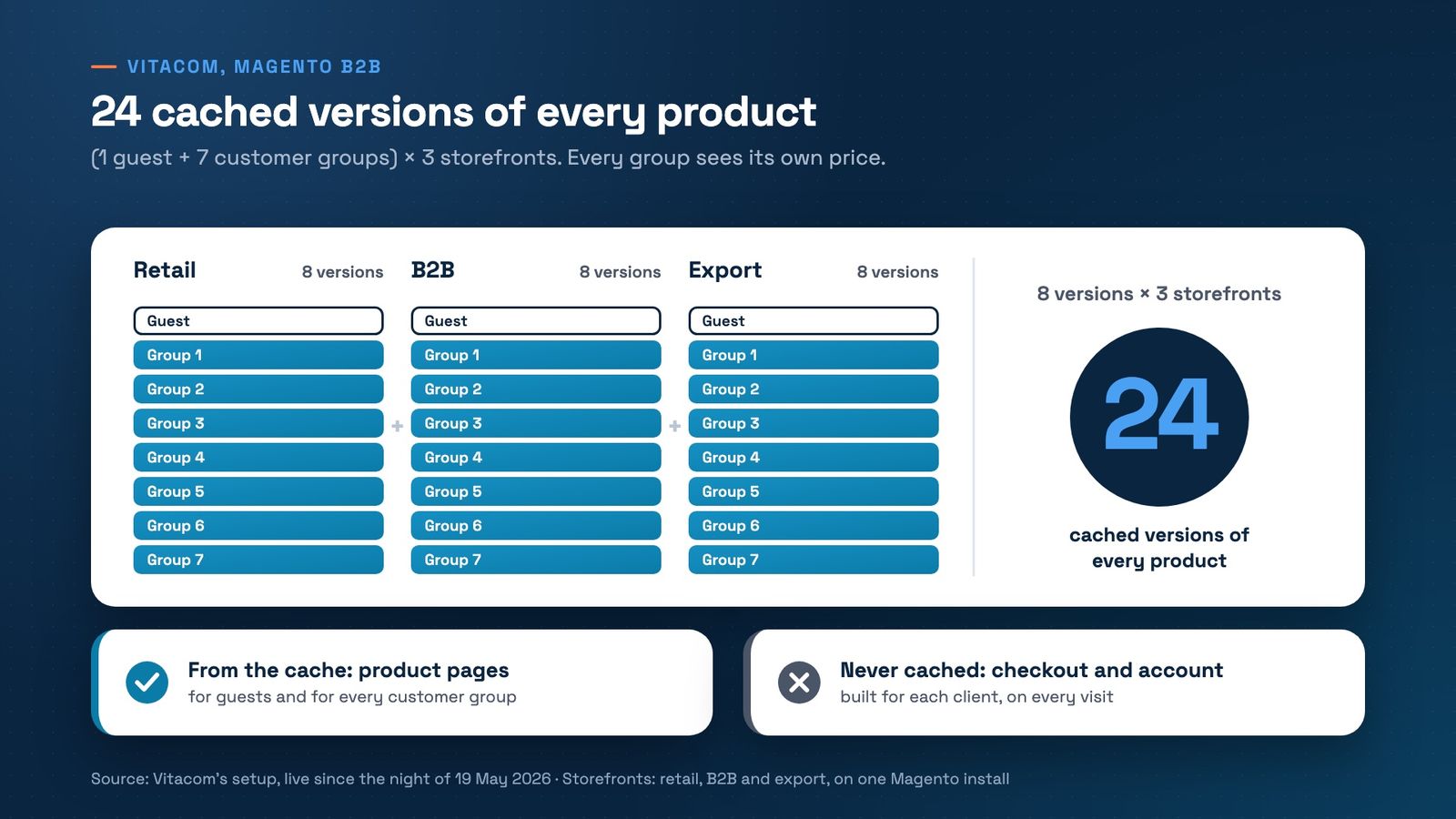
Vitacom has three storefronts on the same Magento install (retail, B2B and export) and clients organised in groups. The sum looks like this:
- 1 version for guests;
- 7 versions, one for each customer group;
- so 8 versions per storefront, times 3 storefronts: 24 versions of every product.
A B2B client who logs in gets their group's copy, with their group's prices. A client from another group gets another copy. Nobody sees someone else's price, because each group has its own page.
What is never cached
Some pages are personal and have no place in a shared copy:
- checkout, with each client's address, delivery and payment;
- account pages: orders, addresses, company details.
At Vitacom, these pages are never cached. They are built for each client, on every visit. Product pages come from the cache, for guests and for every group.
What changed at Vitacom
Caching per customer group went live on the night of 19 May 2026, together with the Liquid Framework and Hyvä Checkout. What showed straight away:
- database CPU went from between 200% and 350% (100% is one core) to mostly under 50%, right after go-live;
- the server could be cut to 8 cores and 32 GB, down from 64 cores and 256 GB at the audit.
And the number that won Best Performance Improvement at HIVE Germany 2026: server response went from 15,814 ms to 12 ms. The 12 ms is Varnish serving a product page from the cache. The 15,814 ms was the old server building the homepage from scratch. They are different pages, but both show how long a shopper waits for the first answer, on the live store. The phases of the project are in Three Go-Lives, Not One Big Launch.
The five-minute check
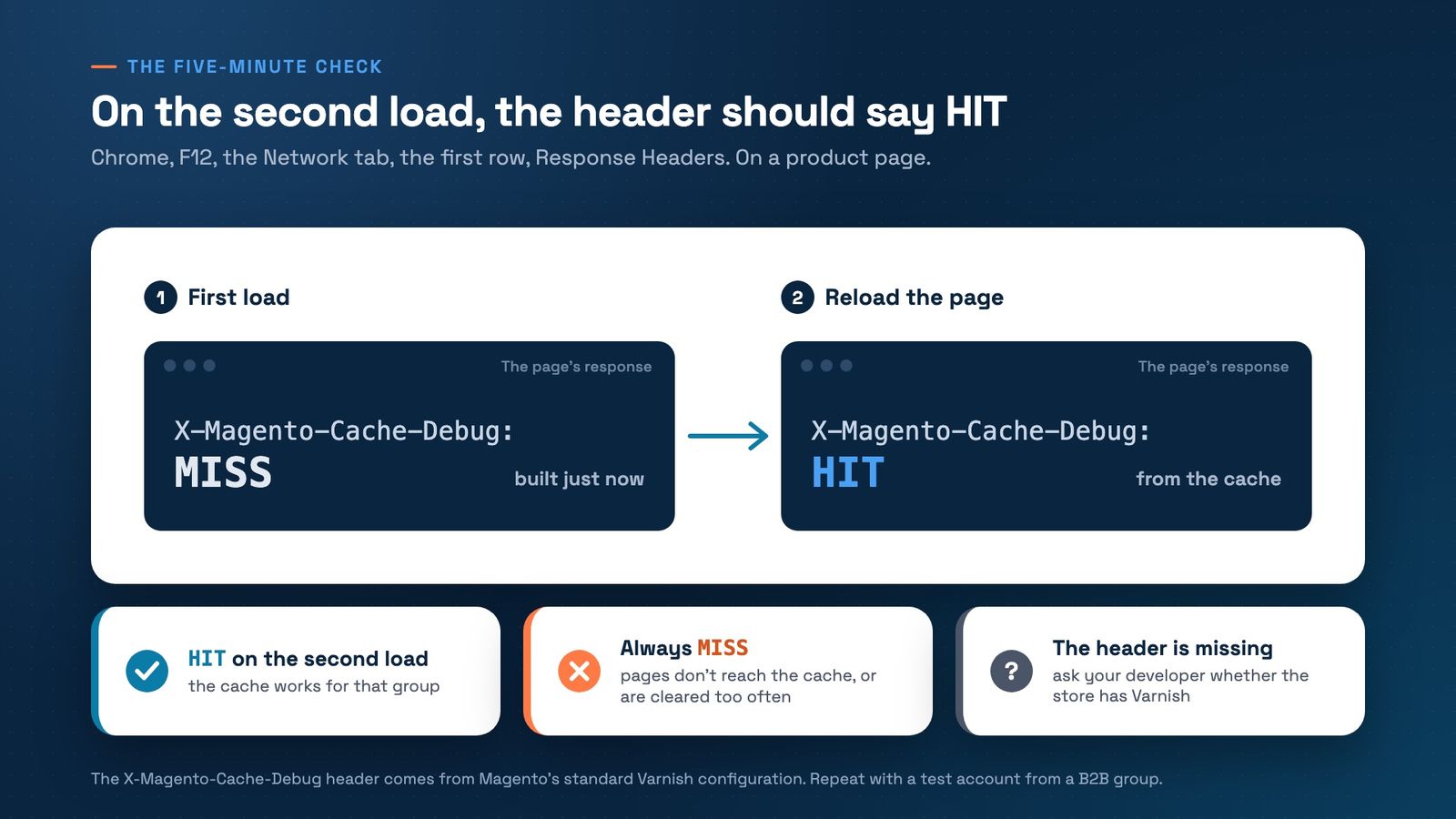
You don't need a developer to see whether pages come from the cache. Magento's standard Varnish configuration adds a header called X-Magento-Cache-Debug to every response, which says HIT (from the cache) or MISS (built just now).
- Open a product page in Chrome, without logging in.
- Press F12, choose the Network tab and reload the page.
- Click the first row in the list (the page itself) and look for X-Magento-Cache-Debug under Response Headers.
- Reload. The first time it may say MISS. The second time it should say HIT.
- Log in with a test account from a B2B group and repeat steps 2 to 4 on the same page.
How to read the result:
- HIT on the second load, both as a guest and logged in: the cache works for that group.
- Always MISS: pages don't reach the cache, or they are cleared too often. There is work to do here.
- The header is missing: ask your developer whether the store has Varnish and whether the header was removed on purpose.
And one common-sense check, just as important: with two test accounts from different groups, open the same product. Each account must see its own group's price.
For your developer
The technical part, in short
- Varnish keeps a separate copy for each value of the X-Magento-Vary cookie. Magento sets this cookie from the visit's context (store, customer group), and the VCL adds it to the cache key. That is where the per-group versions come from.
- A single block with cacheable="false" in a layout makes every page that uses that layout uncacheable. Search the frontend layouts before concluding that B2B "can't be cached".
- The other way round, your own account pages must carry cacheable="false". Without it, one client's data can end up in the group's cached copy.
- In our tests on Magento 2.4.8, Magento's built-in cache never served a HIT to a logged-in customer. To serve B2B clients from the cache, you need Varnish.
- The header to check is X-Magento-Cache-Debug (HIT or MISS).
What it means for your store
If you have been told a B2B store can't be cached, the right question is: "for how many combinations of storefront and customer group?" The answer is a finite number, not "for every client". At Vitacom it is 24 per product.
We wrote separately about other B2B traps on Hyvä, including how customer-group prices are displayed, in Magento B2B on Hyvä: What Works, What Breaks, and What It Costs in Time.
On Magento and Hyvä
The Liquid Framework, our Hyvä Accelerator, keeps the cache full, for guests and for every customer group, so clients get finished pages, not slow copies built from scratch.
Been told your B2B store "can't be cached"? Book a free 30-minute strategy call. We'll check together what reaches the cache, for guests and for every group, and what doesn't.
Get the next article in your inbox
One email a month with new articles, speed fixes and the Magento security patches worth applying.