Guides
What Is a Good Server Response Time for a Magento Store?
November 7, 2026 - by Alexandru-Manuel Carabus
Before anything appears on screen, a shopper waits for the server's first answer. Google calls a TTFB of 0.8 seconds or less good. What the number measures, why a cached page and one built from scratch give different results, why real shoppers see something other than a test, and how to check your own store.
A shopper taps a product. Before a title, a photo or a price appears, their phone waits for the first answer from your server. That wait has a name: server response time, or TTFB (Time to First Byte). Google has a clear number for it: 0.8 seconds or less.
Below is what the number measures, why the same number looks different on different pages, why real shoppers see something other than a test, and how to check your own store in ten minutes.
What the "first byte" actually is
Think of ordering at a counter. TTFB is not the time until you get your food. It is the time until the person at the counter says their first word.
On web.dev, Google describes TTFB as the sum of a few stages:
- any redirects (for example from store.com to www.store.com);
- looking up the address (DNS);
- opening the secure connection;
- the request itself, until the first byte of the response arrives.
The last stage is where Magento works: it runs the code, the modules and the database queries to build the page. On a slow store, that is where almost all the time goes.
It matters because everything comes after it. Text, images and buttons cannot start to appear before the first byte. A server that answers in 3 seconds adds those 3 seconds to every other number on the page.
What Google says: 0.8 seconds or less
On web.dev, Google writes that a good TTFB is 0.8 seconds or less, and a poor one is over 1.8 seconds. On the same page it calls the thresholds "a rough guide".
Two things are worth knowing before a number scares you:
- TTFB is not a Core Web Vital. Google writes that a site does not absolutely need to meet the "good" threshold, as long as it doesn't stop the site from doing well on the numbers that matter, the Core Web Vitals.
- The threshold has a purpose. Google ties it to the first content on screen: the server should answer fast enough that 3 out of 4 visits (the 75th percentile) see the first content within the "good" limit.
In short: TTFB doesn't give you a grade from Google, but it is the first step of the numbers that do. On Magento, a high TTFB is almost always a sign that the server builds too much for each page.
Why a homepage and a cached page give different numbers
A well-run Magento store answers in two ways.
From the cache. Varnish, the page cache, keeps a finished copy of the page. When the next shopper arrives, it sends that copy straight away, without starting Magento and without touching the database. The answer comes in milliseconds.
Built from scratch. When the page isn't in the cache (the first visit after a change, a page nobody opens often, a cache that doesn't work), Magento builds it again. How long that takes depends on how much work the store puts into every page.
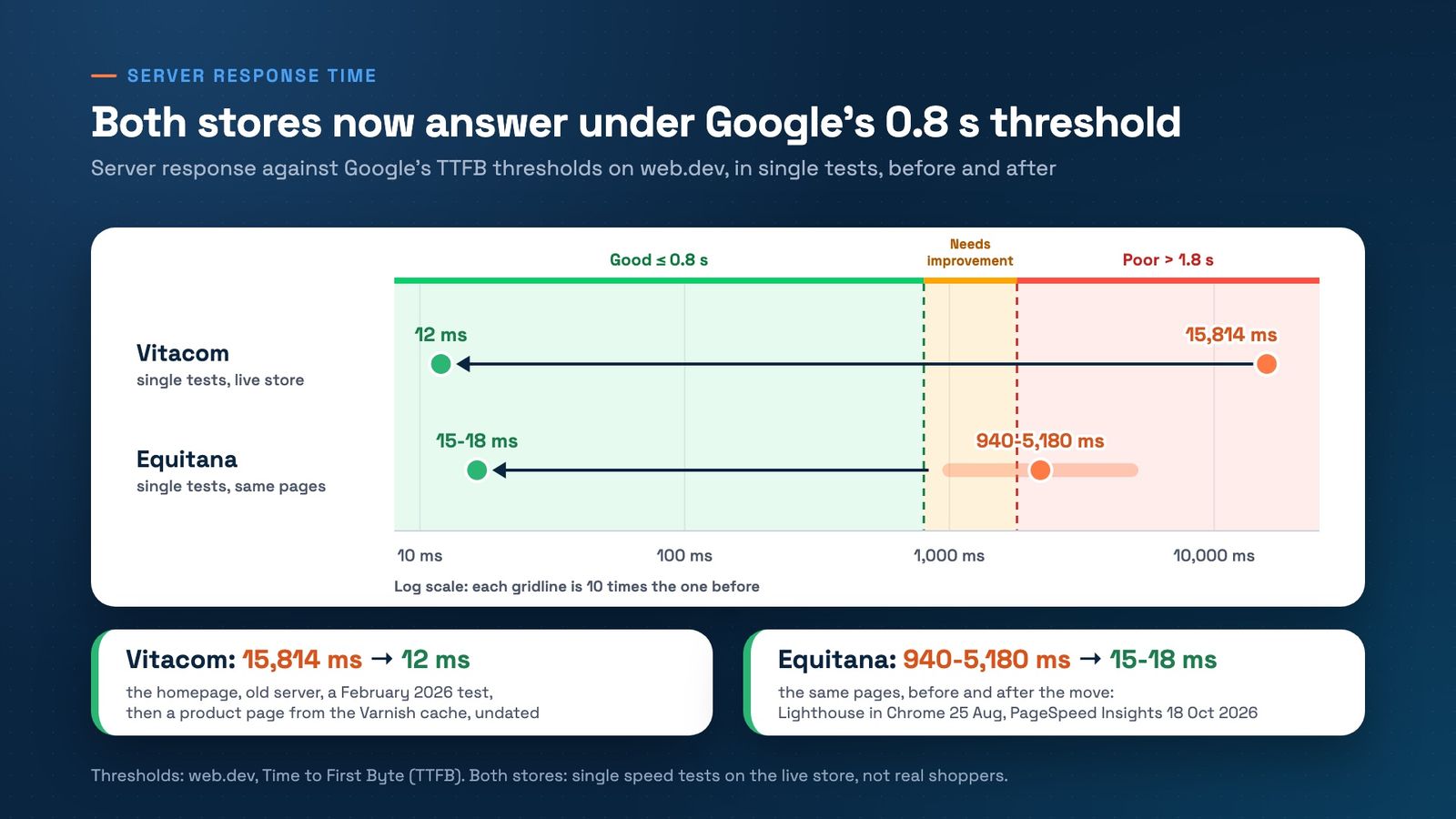
Our best-known example shows both. At Vitacom, server response went from 15,814 ms to 12 ms, in speed tests on the live store. That project won Best Performance Improvement at HIVE Germany 2026. But the two numbers don't come from the same page, and we say so openly:
- 15,814 ms was the homepage, built by the old server, in a test from February 2026;
- 12 ms is a product page served by Varnish from the cache, after the rebuild;
- both are single tests, and the after test carries no date.
Different pages, then. What they share: both measure how long a shopper waits for the first byte, on the live store. The huge gap comes from the fact that on the old server Varnish was installed but bypassed, so every page was built from scratch.
The lesson for your own store: a fair comparison uses the same page, before and after. We wrote about that in Five Questions to Ask Any Before-and-After Speed Claim.
Real shoppers or a test visit
The same page can have two TTFB values, and both are right.
A test visit. PageSpeed Insights and other tools load the page once, from a data centre, at the moment you press the button. You see how fast the server answers on that route, at that moment. Run the test again and the number moves.
Real shoppers. The top of the PageSpeed Insights report comes from the Chrome UX Report: real visits in Chrome over the last 28 days, at the 75th percentile. It includes each shopper's network, their phone and their distance from the server. That's why the real-shopper number is higher than a test's, even on a fast store.
An example with real numbers: at Equitana, after the move from Magento 1 to Magento 2 with Hyvä, phone TTFB for real shoppers fell from 3,653 ms to 344 ms. The before window runs from 19 July to 15 August 2026, the last 28 days fully on Magento 1. The after window, from 30 August to 26 September 2026. At 344 ms, the store sits comfortably under Google's 0.8-second threshold, for real shoppers, on phones. The story of the move is in Still on Magento 1 in 2026? Equitana Moved in Five Days.
The same store in a test visit: on the same pages, Equitana's server now answers in 15 to 18 ms, against 940 to 5,180 ms before the move. The gap between 18 ms and 344 ms is the shopper's side: the phone network, setting up the connection and the trip there and back.
When someone shows you a TTFB number, ask first: test visit or real shoppers?
How to check your own store
You need Chrome and ten minutes.
- Open PageSpeed Insights for your homepage, one category and one product. At the top, in the real-shopper data, look for "Time to First Byte (TTFB)". Under 0.8 s is good. If it says "no data", the store has too few Chrome visits for Google to publish the number. That is not a fail.
- Check whether the data is for the page or the whole site. When a page has too few visits, PageSpeed Insights shows the number for the whole site.
- Read the test visit further down for the same page. The diagnostics list shows how long the server took to answer in that test. Run it a few times and write down the lowest and the highest value.
- Load the same product page twice, as a guest. If the second answer still takes seconds, the page isn't coming from the cache.
- Compare fairly. The same page, the same tool, with the date written down, before and after any change.
If your homepage, category and product have very different numbers, almost certainly some come from the cache and some don't. That's where the work starts.
On Magento and Hyvä
The Liquid Framework, our Hyvä Accelerator, works on exactly this wait before the first byte: shoppers get finished pages from the cache instead of pages built from scratch, and the next page can start loading before the click.
At Equitana, which runs on the Liquid Framework, 53% of phone page views open instantly: 26.7% are prerendered and 25.9% come from the browser's back/forward cache. Before, on Magento 1, both were 0%.
Not sure whether your store answers from the cache or builds every page from scratch? Book a free 30-minute strategy call. We'll look at your numbers together and tell you where to start.
Get the next article in your inbox
One email a month with new articles, speed fixes and the Magento security patches worth applying.