Guides
When a Store Asks Shoppers to Call In Their Orders
November 7, 2026 - by Alexandru-Manuel Carabus
A note asking shoppers to call if they cannot order looks like care. It is a symptom. Five signs your team feels before your shoppers do, with Vitacom's before and after figures, and five questions to ask this week.

Some online stores carry a small note, at the top of the page or next to the cart: if you cannot place your order, call us. It looks like care for the customer. In fact, it is a symptom. Someone on the team has seen orders that did not go through and picked the quickest fix: a phone number.
Vitacom, a Romanian electronics retailer in business since 1991, had a note like that when we took the project over, in January 2026. It read:
"We apologise for any technical problems! If you have difficulty placing an order, contact us at +40 728 503 559. Thank you for your understanding!"

That is our translation; on the site it was in Romanian, in the header of every page.
Today the same store's server answers in 12 ms, and the case won Best Performance Improvement at HIVE Germany 2026. Between those two points sit a few signs the team had felt long before the shoppers did. If your store feels slow, you can look for them this week.
The note is nobody's fault
Let us say this up front: a note like that does not mean someone did a bad job. It shows up in stores that grew for years. A module for search, one for filters, one for brands, one for stock. Each had a good reason on the day it was installed. Together, at some point, they make the store heavy.
The note has another problem: it shows only part of the loss. The shoppers who call are the patient ones. The ones who do not call close the page and buy somewhere else, and they leave you no sign at all. At Meet Magento Netherlands 2026, Ksenia Zvereva from Mollie called a note like this a "conversion killer".
And every order taken by phone is typed in by hand by someone on your team, in time they could have spent on something else.
Sign 1: the admin drags
The first people to feel a slow store are not the shoppers but the people in the admin. You save a product and wait. You open the order list and wait. The team starts working "one at a time", so as not to block something.
At Vitacom, a video filmed on the day the first phase went live shows the same admin page on the new server and on the old one. On the new one it loaded twice as fast.
What to ask: on an ordinary day, how long does it take someone on your team to save a product? If the answer comes with a sigh, that is a sign.
Sign 2: changes show up late
Magento does not search the products directly. It searches lists prepared in advance, which it rebuilds after every significant change: that is reindexing. While it runs, a new product or a changed price may not show up in search or in the category yet.
At Vitacom, the search reindex took 2 hours and 24 minutes. After the rebuild it takes 1 minute and 45 seconds.
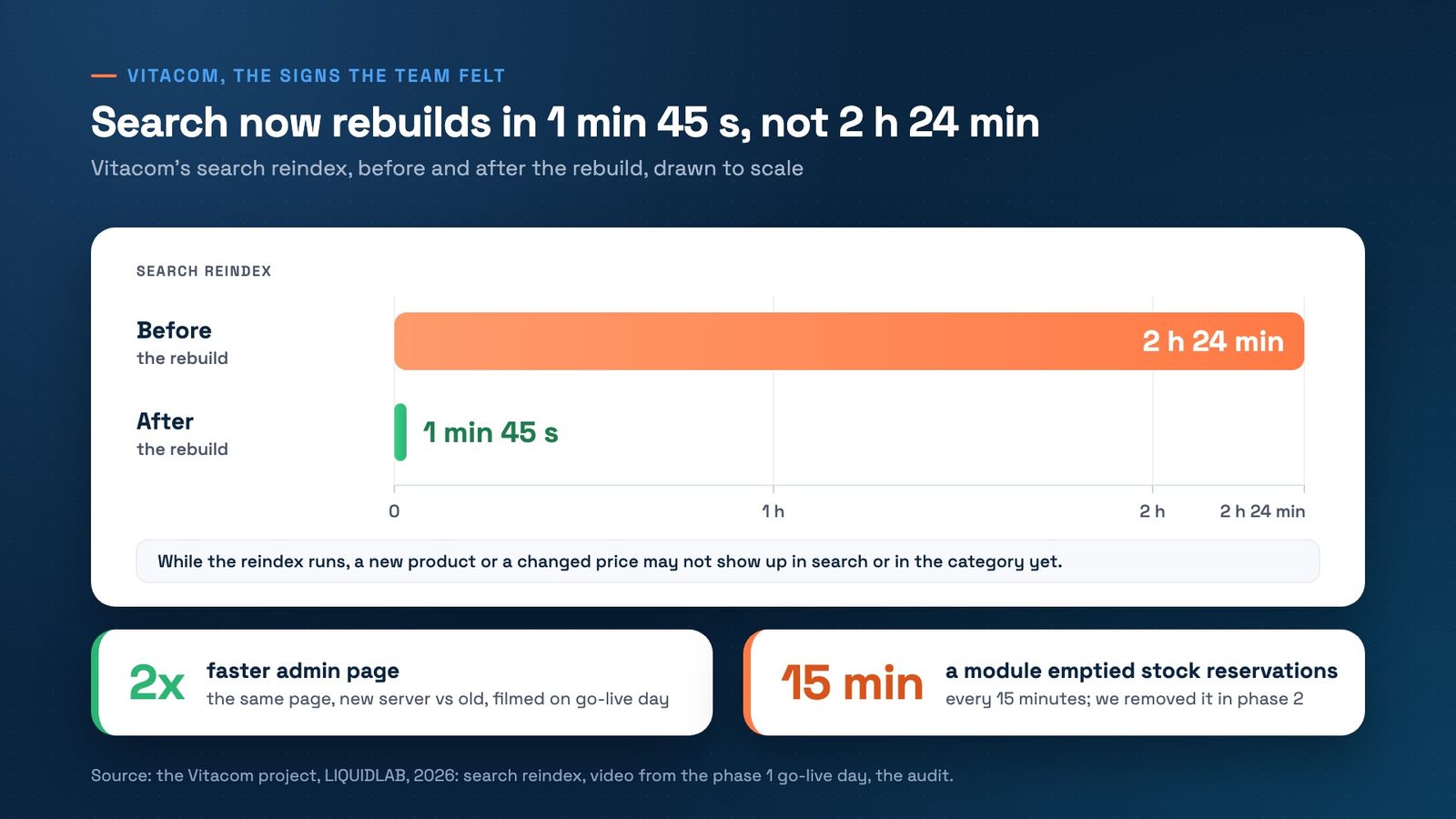
What to ask: if you change a product now, how soon can a shopper find it in search? If the answer is "tomorrow morning", that is a sign.
Sign 3: the stock no longer matches the shelf
When a shopper places an order, Magento sets the ordered quantity aside until it ships. This is called a stock reservation, and it is why the store does not sell the same item twice.
In the Vitacom audit we found a module that emptied these reservations every 15 minutes. We removed it in the second phase. A module like that shows no error. The effect shows in the stock: the store believes it still has items to sell that it has already promised to someone else.
What to ask: for ten products that sell often, is the quantity in the admin the same as on the shelf? If the team corrects stock by hand, often, that is a sign.
Sign 4: a bigger server did not help
When a store is slow, the first reflex is a bigger server. Vitacom ran on 64 cores and 256 GB of RAM, and the server still took 15,814 ms to answer on the homepage.
The hardware was not the problem. In the audit, a single page could reach 15 million database operations, and a single unused module generated 9.9 million queries on every product view. A bigger server only does the same useless work a little faster.
After the rebuild, the store runs on 8 cores, 8x less hardware, and the server answers in 12 ms. The first figure is the homepage, the second a product page answered from the cache, so read them as the size of the change.
What to ask: did you upgrade the server in the last two years and the store stayed just as slow? Then the problem is in what runs on the server, not in the server.
Sign 5: updates keep getting postponed
A heavy store is also a fragile store. Every update feels like a risk, and risks are easy to postpone.
At Vitacom, the audit of November 2025 found 12 Adobe security bulletins not applied, on Magento 2.4.6-p1. In the first phase we brought the store to 2.4.6-p13, with every patch.
Shoppers do not see this. But a missing patch is an open door, and an update postponed for too long eventually becomes a whole project.
What to ask: which security patches were applied last, by name, and when? How to check them is in our post on the two Magento patches of September.
What we changed at Vitacom, in short
We did not start with speed. We worked in three phases, each launched on its own and measured before the next:
- Security, in February. A new server built for Magento, every missing patch, the exposed test environments closed.
- Simplify, in March. Search moved to ElasticSuite, and the module that emptied the stock reservations was removed.
- Speed, on 19 May. Liquid Framework and Hyvä Checkout, then the server cut down to 8 cores.
We kept Magento and Hyvä. We changed the modules, the code and the server. The phases are described in detail in our post on the three go-lives, and the figures in the Vitacom case study.
What you can do this week
- Place a test order on a phone, on mobile data, like a shopper. Note where you waited.
- Ask who answers the phone calls about orders, and how many there were last month. It is the most honest checkout report you have.
- Put the five questions above to your team. No tools needed, just honest answers.
- Do not remove the note before you fix the cause. Without it, the shoppers who call today will leave without saying a word.
On Magento and Hyvä
In Liquid Framework, checkout, delivery dates, stock and payments run on the same managed stack as the rest of your store. We update them together, test them on staging and watch them in production. Under our SLA, failed payments are a Critical ticket with a 2-working-hour response, and a broken checkout is a Major ticket with a 4-working-hour response. Details on the Checkout & Conversion page.
Do you recognise any of these signs in your store? Book a free 30-minute strategy call. We will look together at where the waiting comes from and what is worth fixing first.
Get the next article in your inbox
One email a month with new articles, speed fixes and the Magento security patches worth applying.