Guides
How eMAG Wins Traffic From Google, and What a Magento Store Can Copy Tomorrow
November 17, 2026 - by Alexandru-Manuel Carabus
What eMAG's robots.txt, sitemaps and HTML reveal about its SEO, and the 9 technical checks we ran on a Magento store on Hyvä: what to check, what we found and how to fix it. Plus a 30-minute audit.
Many store owners think eMAG rules Google because it has money, a famous name and millions of products. True, but incomplete. Look at the files eMAG shows to any crawler (robots.txt, sitemaps, the HTML of its pages) and you see something else: a very disciplined SEO architecture built on simple rules. And architecture, unlike authority, can be copied by any store.
We put the two side by side. We analysed what eMAG does, then audited a Magento 2 store on Hyvä that we look after (about 11,000 products, ElasticSuite search). We checked 9 points. 6 are real problems, which we are fixing now, one was already set up correctly, and the last 2 are planned. They are exactly the areas where eMAG wins the most.
Below it is all laid out as a tutorial: what to check, how to spot the problem and how to fix it. At the end there is a 30-minute audit you can run yourself.
Part 1. What eMAG does, from public data
Everything below comes from eMAG's public robots.txt, its sitemaps and the HTML of its pages, checked on 17 November 2026.
Internal search brings no traffic from Google
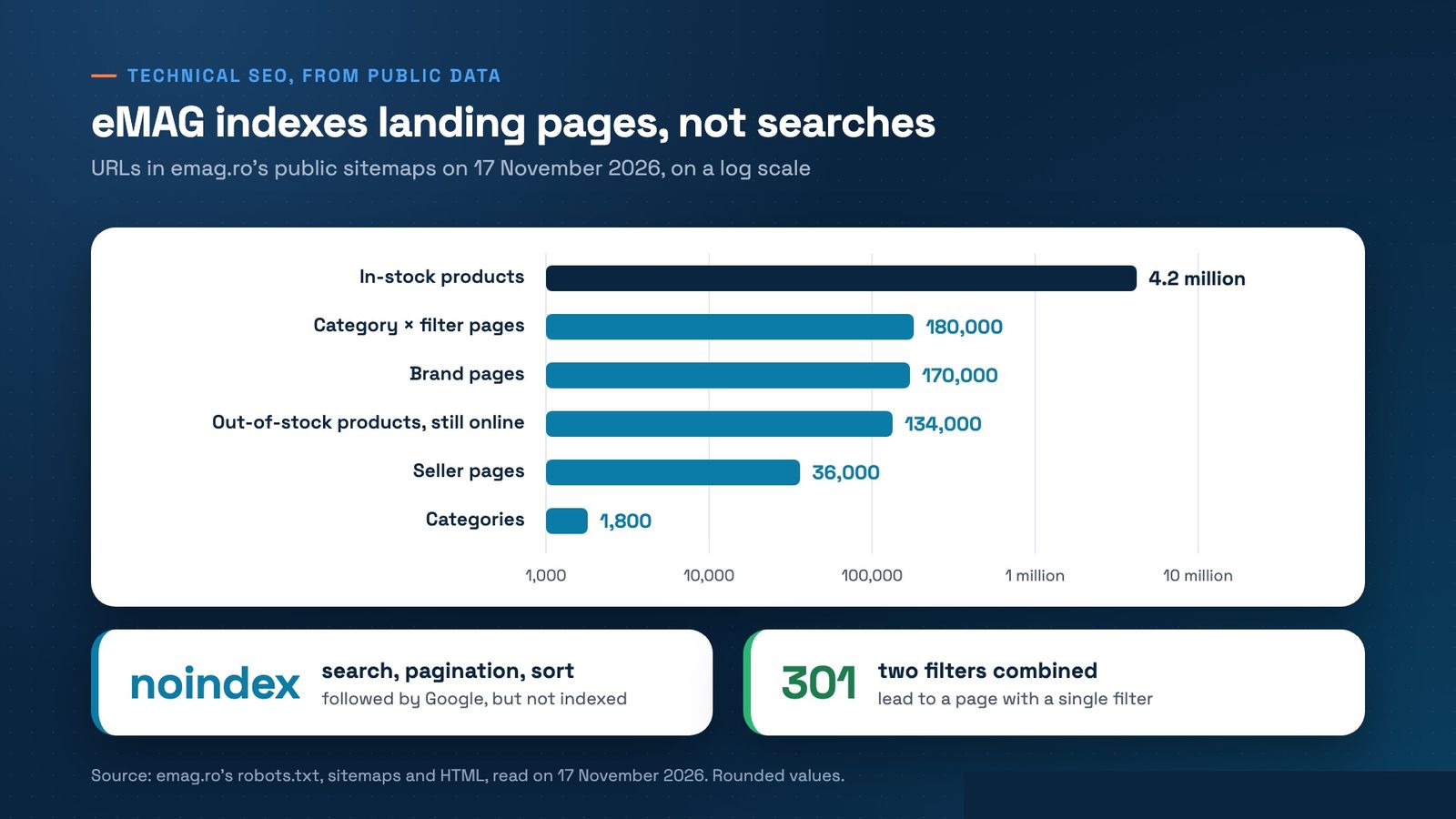
Surprise: eMAG does not rely on its internal search result pages. Every /search/... URL carries noindex,follow. Google may follow the links on them, but does not put them in its index.
Landing pages generated programmatically, at scale
The traffic comes from pages built on purpose for what people search for, all listed in sitemaps:
- about 1,800 categories;
- about 180,000 category × filter pages (brand, attribute, seller, price range, rating, new products);
- about 170,000 brand pages and 36,000 seller pages;
- about 4.2 million in-stock product URLs (841 sitemap files of 5,000 URLs each), plus about 134,000 out-of-stock products that stay online.
On 17 November the category and filter sitemaps carried that same day as their last-modified date (lastmod): they are rebuilt daily. Google gets the signal that something moves every day.
Clean URLs, titles from a template
Filtered pages have path-style URLs, not parameters: /vitamine-minerale/brand/solgar/c or /vitamine-minerale/filter/forma-textura-f8091,jeleuri-v-5597610/c. Each page has a self-referencing canonical, a title from a template ("Vitamine si minerale Solgar", vitamins and minerals by Solgar) and a meta description full of buying arguments: pay in instalments, open the parcel on delivery, easybox lockers, free 30-day returns.
Strict control over indexing
This is the part most stores miss:
- pagination carries noindex,follow and prev/next links;
- sort URLs carry noindex and a canonical to the category;
- combining two filters triggers a 301 redirect to a single-filter page, so the number of URLs never explodes;
- tracking parameters (?ref=) carry a canonical to the clean URL;
- robots.txt blocks the cart, checkout, compare, wishlists, AJAX calls and sort × pagination combinations.
Links Google can follow
The server-rendered HTML of a category holds almost 100 plain links (a href) to filtered pages: we counted 99 on the vitamins and minerals category. Every product's breadcrumb ends at the brand page within its category. The result: millions of product pages link up to the landing pages.
The product page, a source of fresh content
Full Product schema (offer, rating, reviews, brand, sku and mpn), BreadcrumbList and, on products with questions, QAPage built from shoppers' questions. The EAN sits in the URL. There is hreflang to emag.bg and emag.hu. Reviews and questions keep adding unique text, written for free by buyers.
One detail goes against a lot of SEO advice: eMAG's category pages carry no JSON-LD and no long blocks of SEO text. They win on relevance and authority, not on paragraphs stuffed with keywords.
What you cannot build overnight: authority
To be fair, much of eMAG's strength comes from its brand. Semrush estimates for October 2026 that on desktop 37.6% of visits come direct, from people typing emag.ro, against 18.46% from google.com. These are estimates, not official data, but they say the same thing: many shoppers never pass through Google at all. Architecture takes a few weeks. Authority takes years. The good news: in a niche, a 10,000-product store with the right architecture can beat a giant on specific searches.
eMAG next to a typical Magento store
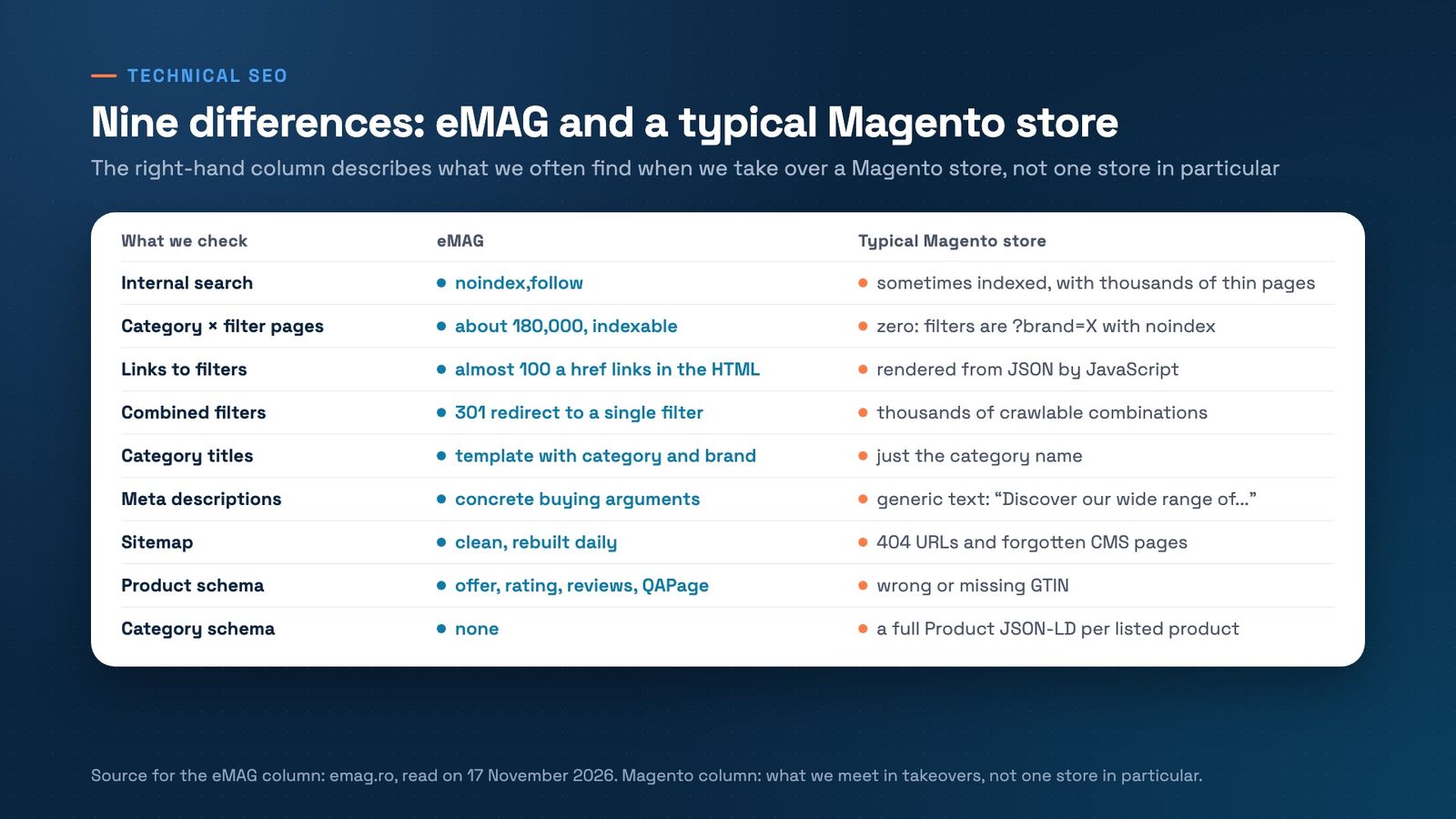
The table below puts the nine differences side by side. The right-hand column describes what we often find when we take over a Magento store, not one store in particular.
Part 2. Technical checklist for Magento: 9 checks
Each point has three parts: how to check, what we found and how to fix it.
1. Sitemaps for disabled language versions
How to check: open /robots.txt and every sitemap listed there. Pick 10 random URLs from each and check they answer 200.
What we found: the sitemaps for two disabled language versions were still being generated and announced in robots.txt. About 11,000 URLs, all 404. Google was spending crawl time on pages that did not exist.
How to fix it: take the sitemaps out of robots.txt and delete the sitemap records and generated files with a data patch. Careful: keep the index files the other store views still use.
2. The GTIN in your structured data
How to check: open the source of a product page, search for "gtin" and compare the value with the EAN on the box.
What we found: the GTIN field was mapped to the SKU. Google saw something like "gtin":"10452", an invalid code for Merchant listings and product snippets.
How to fix it: map the GTIN to the attribute that holds the real EAN (such as 5901234123457). In our case about 96% of products already had a valid EAN. The lesson: don't assume, check what the field actually holds.
3. Internal links to non-canonical URLs
How to check: on a category page, look at the links to products. If they look like /category/subcategory/product.html while the product page has a canonical to /product.html, you have a problem.
What we found: "Use Categories Path for Product URLs" was set to Yes. Every internal link sent Google to a URL that then said "I am not the main page".
How to fix it: in Stores > Configuration > Catalog > Catalog > Search Engine Optimization, set "Use Categories Path for Product URLs" to No. Internal links then land straight on canonical URLs.
4. Cloudflare's managed robots.txt and AI crawlers
How to check: open your public robots.txt and look for rules you did not write. On Cloudflare, check AI Crawl Control and the managed robots.txt setting.
What we found: Cloudflare's managed robots.txt was quietly blocking search crawlers and AI assistants, even search engines such as Baiduspider and PetalBot.
How to fix it: allow AI search crawlers (OAI-SearchBot, PerplexityBot, Claude-SearchBot) and agents acting for a user (ChatGPT-User), switch off the managed robots.txt and keep the opt-out from model training in the store's own robots.txt (Google-Extended, Applebot-Extended, GPTBot, ClaudeBot, CCBot, Bytespider, meta-externalagent). The lesson: block AI search and your store does not show up when a shopper asks ChatGPT or Perplexity what to buy.
5. Forgotten CMS pages in the sitemap
How to check: open the sitemap and filter out everything that is not a product or a category.
What we found: an old 404 page, a sample "return policy" left by a vendor, an old theme homepage and the failed-order page.
How to fix it: disable the pages you don't use. For pages that must stay live but have no business in Google (such as the failed-order page), a small plugin keeps them out of the XML sitemap.
6. Heavy JSON-LD on category pages
How to check: on a category, count the application/ld+json blocks. A full Product block for every listed product is dead weight.
What we found: about 45 KB of JSON-LD per page, roughly 4.5% of the HTML, which Google ignores on listings.
How to fix it: replace it with a single schema.org ItemList of product URLs, with the position carrying on from one page to the next. Fewer bytes, same signal.
7. Internal search results
How to check: search for /catalogsearch/ in robots.txt and in the Pages report of Google Search Console.
What we found: search was already blocked in robots.txt. At about 11,000 products that is the right call. eMAG's model (crawlable search with noindex,follow) makes sense at millions of products, where search helps Google discover pages. On a mid-size catalog it only burns crawl budget.
How to fix it: nothing, this time. Sometimes the right answer in an audit is "leave it".
8. Filters: the biggest gap with eMAG
How to check: on a category, view the page source (not the inspector) and look for the filter links. If filters only appear after JavaScript loads, Google does not follow them. Then open a filtered URL and look for noindex.
What we found: the ElasticSuite filters were rendered from JSON by JavaScript, not as links, and filtered URLs (?brand=X) carried noindex. Result: zero indexable brand × category or attribute pages. Exactly where eMAG has 180,000.
How to fix it (our plan): don't index everything. Build an allow-list of a few hundred combinations people actually search for, taken from your Google Search Console queries. Each one gets:
- a clean, path-style URL;
- a title and H1 from a template;
- a self-referencing canonical;
- a place in the sitemap;
- an a href link in the server-rendered HTML.
Every other combination stays noindex.
9. Meta titles and descriptions
How to check: search Google for site:yourstore.com and read the titles and descriptions the way a shopper sees them.
What we found: category titles were just the category name, or "Name - Parent category". Descriptions were generic ("Discover our wide range of..."), with no brand and no reason to click. Plus a trap: the {{store}} variable in the meta tag template printed the store view's name, which was "RO".
How to fix it: a title template such as "{{name}} - Prices and Stock | Your Store", and a 120-160 character description with 3 concrete buying arguments. Example (141 characters): "Stick vacuums from 12 brands, in stock, 24h delivery, free 30-day returns and instalment payments. Compare the models and order online today." Then do a one-off cleanup of generic hand-written texts so the template takes over.
Part 3. Google Search Console: from data to a plan
Google Search Console tells you what to fix first. For free. Here is how we read it:
- Queries with many impressions and a low CTR: you show up but don't convince. Rewrite that page's title and description.
- Queries in positions 8-20: the cheapest wins. A page on page two climbs far more easily than one that is not in the results at all.
- Queries with demand but no matching page (brand + category, say, that now land on a product page or the homepage): the candidates for your landing-page allow-list.
- The Pages / Indexing report: the technical errors. Sitemaps with 404s, duplicates, "Crawled - currently not indexed".
- The Product snippets and Merchant listings reports: a valid GTIN puts price and stock straight into the results, plus free listings in Google Shopping.
- A before and after snapshot: export the data before you change anything. Without it you cannot prove the impact.
One important limit: GSC only shows searches you already appear for. For demand you don't capture yet, pair it with a keyword tool such as Semrush.
A 30-minute SEO audit: checklist
Grab a pen and open your store. Every "no" is a task for your technical team.
- Do all sitemaps in robots.txt answer 200 and list only URLs that answer 200?
- Does no sitemap belong to a disabled language or store view?
- Does the gtin field in your product schema hold a real EAN, not a SKU?
- Do category links go straight to the product's canonical URL?
- Does your public robots.txt hold only rules you wrote, with no blocks added by your CDN?
- Can AI search crawlers (OAI-SearchBot, PerplexityBot, Claude-SearchBot) get in?
- Is the sitemap free of test, old or technical CMS pages?
- Do category pages skip a full Product JSON-LD for every listed product?
- Is internal search blocked or noindex?
- Do filters show up as a href links in the page source?
- Do you have at least a few indexable brand × category pages for searches with real demand?
- Do category titles hold more than the category name?
- Do meta descriptions carry concrete arguments (delivery, returns, stock, instalments) in 120-160 characters?
- Does no template variable print technical text (such as "RO")?
- Did you save a GSC export before making changes?
Frequently asked questions
Do I need millions of products to use the eMAG model?
No. The principles work at any size: a clean index, landing pages for real searches, crawlable links. Only the scale differs. At 10,000 products, a few hundred well-chosen brand × category pages beat tens of thousands of combinations generated at random.
Should I index every filter in Magento?
No. Indexing every combination creates thousands of near-identical pages and dilutes your crawl budget. eMAG itself redirects with a 301 when you combine two filters. Index only combinations with proven demand (from GSC or a keyword tool) and keep the rest noindex.
If I block AI crawlers, am I protecting my content?
It depends on what you block. Training crawlers (GPTBot, ClaudeBot, Google-Extended, CCBot) and AI search crawlers (OAI-SearchBot, PerplexityBot, Claude-SearchBot) are different things. You can refuse training and still appear in ChatGPT or Perplexity answers. Block them all and you vanish from a channel more and more shoppers use before they pick a store.
How long until I see the effect in Google?
Technical fixes (sitemap, GTIN, robots.txt) usually show in the GSC reports within days or weeks, once Google has re-read the pages. New landing pages take longer to climb. That is why you take the snapshot first: you compare the same queries, not impressions.
Does Hyvä help with SEO?
Hyvä gives you a fast base and clean HTML, and speed matters to Google and to conversion. But a theme does not fix a sitemap full of 404s or a wrong GTIN: those come from configuration and data, not the theme. The theme is the foundation. You build the SEO architecture on top of it.
How many of these 9 checks does your store fail?
We work only with Magento, for more than 12 years, and the problems above turn up often in the stores we take over. Run the 30-minute audit, then book a free 30-minute strategy call. Bring your list of "no" answers and we'll decide together what to fix first, in order of impact on sales.
Get the next article in your inbox
One email a month with new articles, speed fixes and the Magento security patches worth applying.