Guides
Why a Server 8 Times Smaller Made Vitacom Faster
October 23, 2026 - by Alexandru-Manuel Carabus
Vitacom's store ran on 64 cores and still took 15.8 seconds to answer. Today it runs on 8 and answers in 12 milliseconds. Why more hardware doesn't make a slow Magento page faster, what we changed and in what order, and five checks before you buy a bigger server.
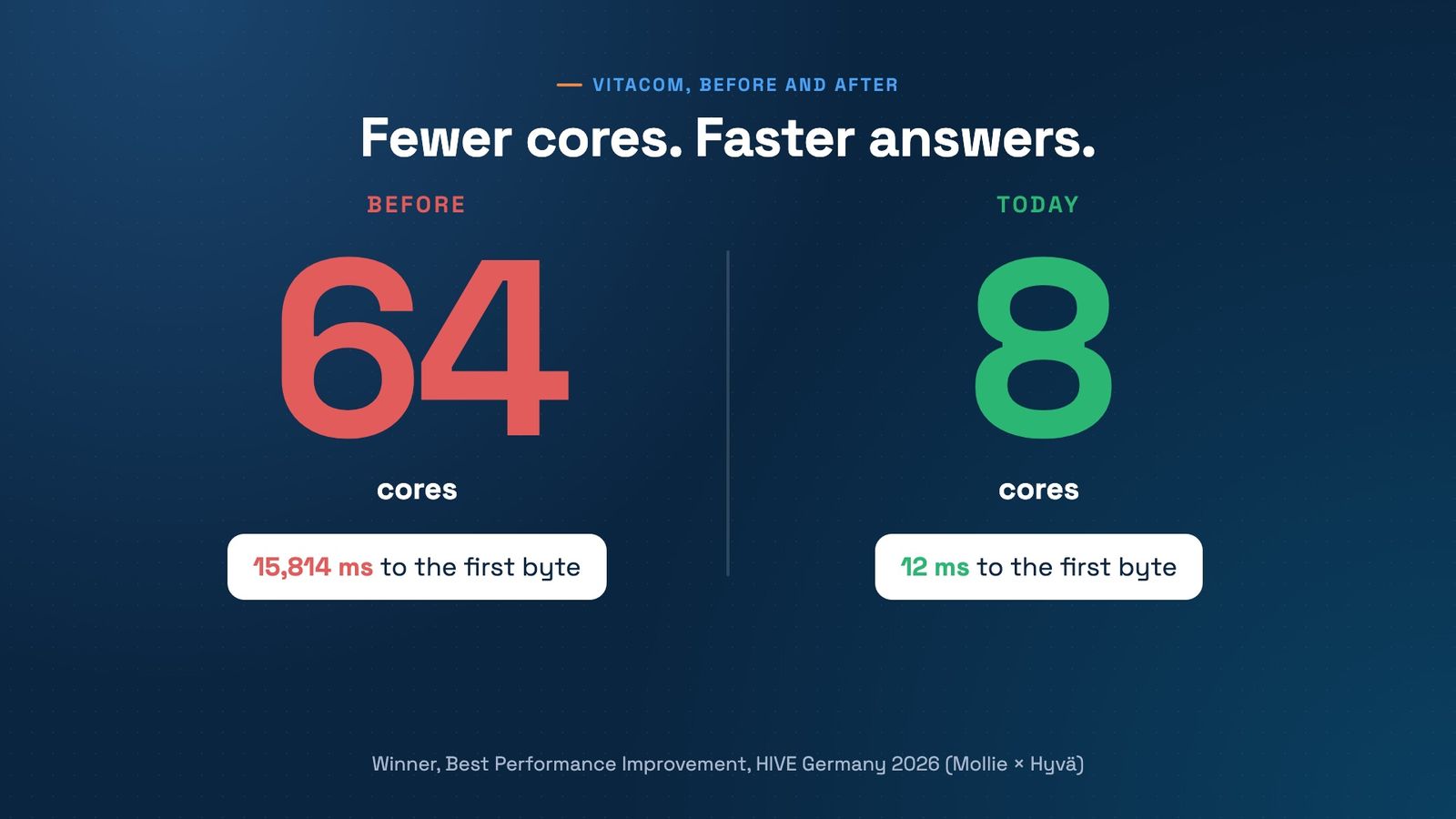
When a Magento store gets slow, the first fix is often a bigger server. Vitacom's had grown to 64 cores and 256 GB of RAM, and it still took 15,814 ms to answer. Today the same store runs on 8 cores and 32 GB and answers in 12 ms. These are the results that won Best Performance Improvement at HIVE Germany 2026.
Here is why the bigger server didn't help, what we changed and in what order, and what to check before you pay for more hardware.
Why more cores don't make a page faster
PHP handles each page request in one process, on one core. A page that needs 15 million database operations takes just as long on a 64-core server as on an 8-core one. The extra cores only let more of those slow requests run side by side. They buy room for more shoppers to wait, not a shorter wait.
Speed comes from doing less work per page, and from not doing it at all when the answer is already known. That's what a page cache is for: Varnish keeps a finished copy of each page and serves it in milliseconds, without starting PHP or touching the database.
What the 64 cores were doing
At our audit in November 2025, every page went all the way to the database:
- Varnish was installed but skipped. Wrong headers kept pages out of the cache, so every visit started PHP again.
- 290+ modules ran on every uncached page, with up to 15 million database operations for a single page.
- The database wasn't tuned for Magento, and two log tables held about 2.4 GB.
- There was no Redis and no RabbitMQ, so cache, sessions and message queues used slower fallbacks.
The server had been enlarged to keep up. It kept the store standing, but it couldn't make a page faster.
What we changed, in this order
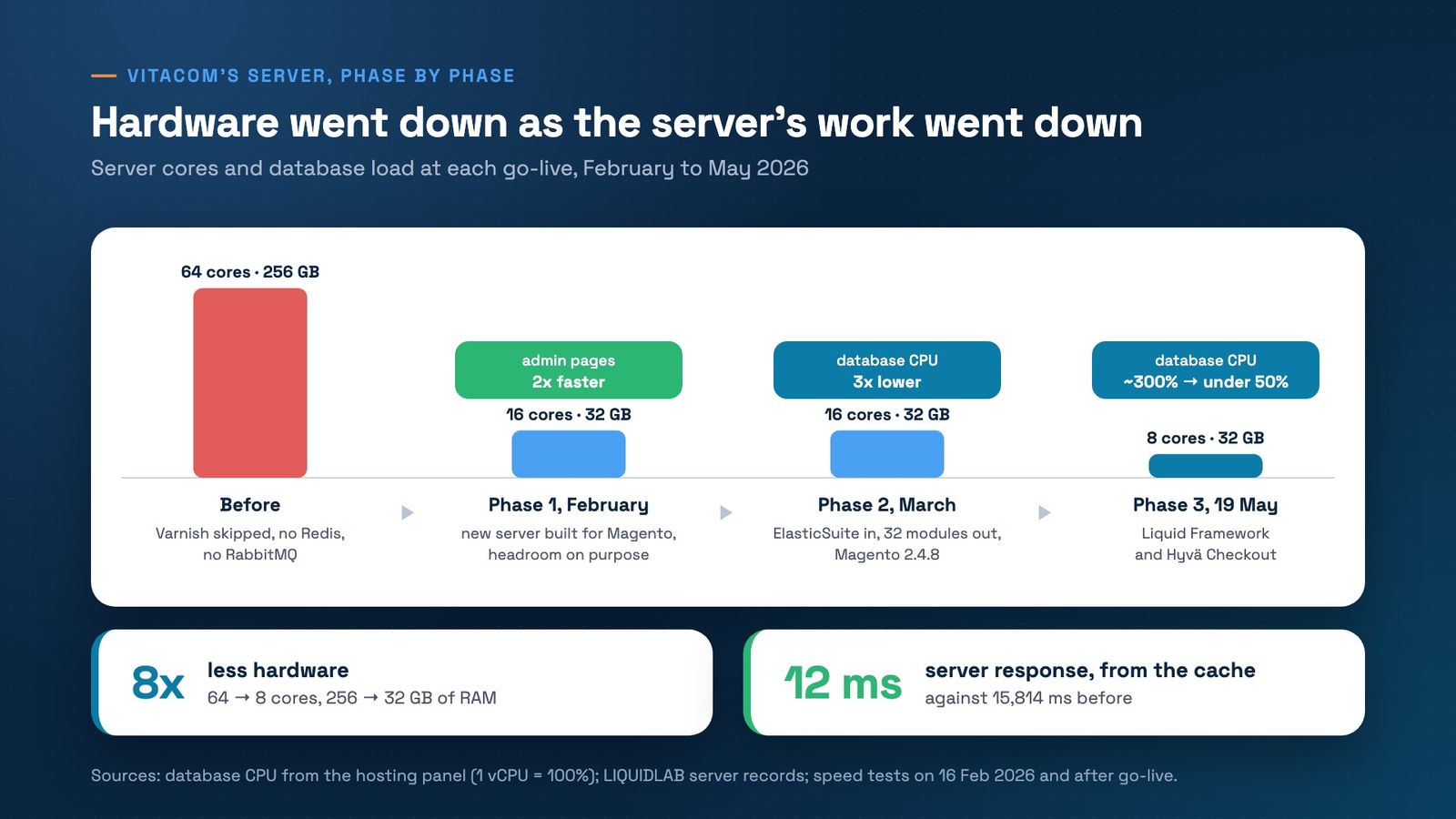
- February 2026, a server built for Magento. Varnish in front, then Nginx and PHP-FPM, Redis for cache and sessions, RabbitMQ for the queues, a database tuned for Magento, and every missing security patch. We sized it at 16 cores and 32 GB, with headroom on purpose while we learned the store. On launch day, the same admin page loaded twice as fast as on the old server.
- March 2026, less work. ElasticSuite replaced 32 search, filter and merchandising modules, and Magento moved to 2.4.8. The database's CPU load fell to a third on average.
- The night of 19 May 2026, the Liquid Framework and Hyvä Checkout. Database CPU went from between 200% and 350% (1 vCPU = 100%) to mostly under 50%, right after go-live. Only then did we move the store to 8 cores.
The order matters. Shrinking the server first would have made a slow store slower. Removing the work first made the smaller server enough.
12 milliseconds is the cache answering
The 12 ms is Varnish serving a product page from the cache. The 15,814 ms was the old server building the homepage from scratch. They're different pages, but both are speed tests on the live store, and both measure how long a shopper waits for the first byte.
A cache only helps if pages actually land in it. Vitacom has three storefronts (retail, B2B and export) and business clients who log in. Each product is now kept in 24 cached versions: one for guests and one for each of 7 customer groups, on each of the 3 storefronts. A logged-in business client gets a cached page too. Account pages and checkout are personal, so they are never cached.
Real shoppers see more than 12 ms, because their own network adds time. We explain the gap in PageSpeed score or real users. And the retired modules cut the extension bill too: up to 31,500 EUR a year in licences.
Five checks before you buy a bigger server
- Load the same product page twice as a guest. If the second answer still takes seconds, pages aren't coming from the cache. With Magento's standard Varnish configuration, the X-Magento-Cache-Debug response header says HIT or MISS.
- Check app/etc/env.php. The cache and session sections should name Redis, and the queue section RabbitMQ (amqp).
- Look at the database's biggest tables. Log and report tables measured in gigabytes mean nobody cleans them.
- Count the modules that run on product pages. The checks in Hyvä was never the problem take an afternoon.
- Watch database CPU, not just server CPU. If the database keeps several cores busy at normal traffic, the problem is the work on each page, not the size of the machine.
On Magento and Hyvä
In the Liquid Framework, the cache warmer refills Varnish in the background through RabbitMQ whenever a product, category or page changes, so the next shopper doesn't get a slow, uncached copy. Product images are cached in Varnish too, and cleared automatically when a product is saved.
Thinking about a bigger server? Book a free strategy call first. We'll look at your cache, your database load and your module list together, and tell you whether the server is really the problem.
Get the next article in your inbox
One email a month with new articles, speed fixes and the Magento security patches worth applying.